Training a Latent Diffusion Model From Scratch
A Hands-On Journey. We start from 0 with a desktop GPU only
Diffusion models amazed me, but I didn’t understand how they worked. So I trained one from scratch to find out.
Most tutorials are math-heavy and codebases are massive. This post focuses on the basics — training small toy models with minimal Python code.

I cover the basics of diffusion and training small text-to-image models from the ground up:
- Basics of Diffusion
- Training on handwritten digits: MNIST
- Training on fashion images: Fashion MNIST
- Evaluate with ClipScore
- Classifier Free Guidance (CFG)
- Training on photos and images: ImageNet
Throughout this blog post, we will construct most of the Python code needed for inference and training of mini versions of NVIDIA’s new Sana model.
It was incredible to see how far a rookie can get after countless hours of digging through codebases, with just a few GPUs and public images. Still, I spent weeks getting this to work, something that George Hotz gets done in 6 hours (watch it).
Note: The complete code and all the disastrous experiments are available in my GitHub repository.
🔗 GitHub - geronimi73/Hana: A Sana-like text-to-image model trained from scratch.
1. Basics
What is diffusion?
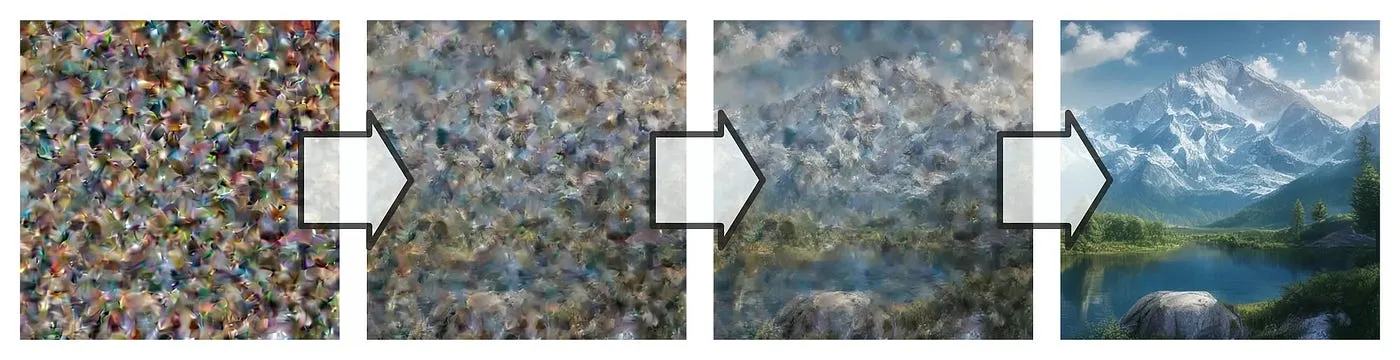
Diffusion is the process of adding noise to an image until it becomes random pixels. The reverse process creates images from random noise.
How does this work exactly?
It’s all about removing noise. There are three components to this:
Diffusion Transformer: Predicts and removes noise from images. It iteratively refines the image, gradually transforming random noise into a detailed image that corresponds to the given text prompt.
Text Encoder: It encodes a text prompt into numerical embeddings. These embeddings guide the image generation process, ensuring that the resulting image aligns with the textual description provided.
Autoencoder: Compresses images into a latent space (encoding) for efficient processing and then decompresses them back into a viewable format (decoding).
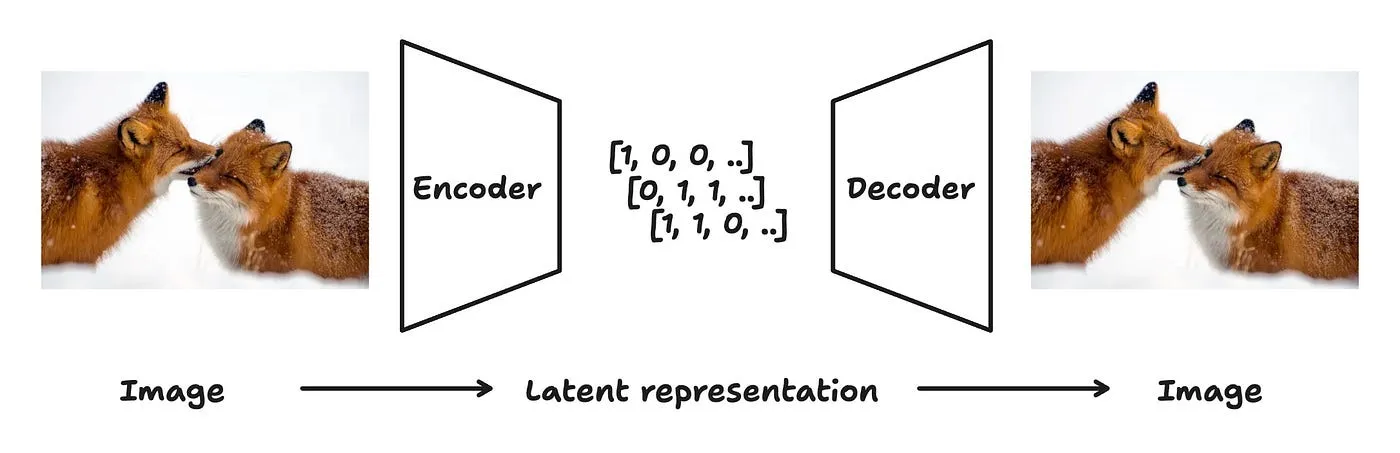
We will now briefly explore how to use these components with some example code.
For a more in-depth, hands-on explanation with additional code examples, please check out my previous blog posts:
Requirements
I’ve been using these package versions, but others might work too.
diffusers                     0.33.1
torch                         2.4.0
torchmetrics                  1.6.1
torchvision                   0.19.0
transformers                  4.51.3
If you plan to rent GPUs and haven’t settled on a provider yet, I recommend RunPod. They offer the RTX 3090 (which I personally use and prefer) for $0.22 per hour. If you’re creating a new account, you can use my referral link to sign up, which I’d appreciate.
Autoencoder
Let’s look at Sana’s Deep Compression Autoencoder. For all the models trained in this blogpost, we use dc-ae-f32c32-sana-1.0.
The “f32c32” in the name reveals its key specs: it compresses spatial dimensions by 32× and always outputs 32 channels. So a 1024×1024 pixel color image (3 RGB channels) becomes a compact 32×32×32 latent tensor. The catch? Your input image dimensions need to be multiples of 32 for this to work.
First, load a random input image and crop from the center:
from PIL import Image
from io import BytesIO
import torchvision.transforms as T
import requests

URL="https://github.com/geronimi73/3090_shorts/blob/main/assets/3.jpg?raw=True"

image = Image.open(BytesIO(requests.get(URL).content))

# Crop a 512x512 image from the center
# AE downsizes image by factor 32 dc-ae-f32c32-sana-1.0-diffusers
# -> image dimensions must be a multiple of 32!
image = T.CenterCrop(512)(image)

# image.size = (512, 512)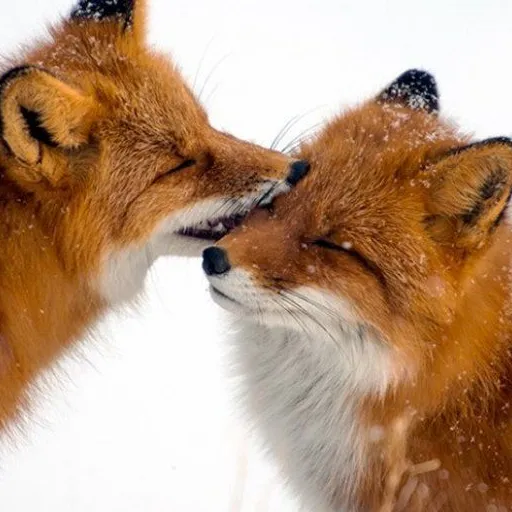
Invoke the Autoencoder and transform the image to a much smaller latent.
import torch
from diffusers import AutoencoderDC

# use CUDA if we have, otherwise Apple Silicon will work too, CPU will be very slow probably
device = "cuda" if torch.cuda.is_available() else "mps" if torch.mps.is_available() else "cpu"
dtype = torch.bfloat16

# Load the Autoencoder which came with the first Sana release
# mit-han-lab/dc-ae-f32c32-sana-1.0-diffusers
dcae = AutoencoderDC.from_pretrained(
    "Efficient-Large-Model/Sana_600M_1024px_diffusers",
    subfolder="vae",
    torch_dtype=dtype
).to(device)

# Convert the image to a tensor and normalize mean and std.
transform = T.Compose([
    T.ToTensor(),
    T.Normalize((0.5, 0.5, 0.5), (0.5, 0.5, 0.5)),
])

# convert, change dtype to bfloat16, and put on device
latent = transform(image)[None].to(device).to(dtype)

# convert to latent
with torch.no_grad():
    latent = dcae.encode(latent).latent
latent.shape
This gives us a latent of shape [1, 32, 16, 16] — a compressed version of our 512×512 input image. Training on these compact latents is much more efficient than using raw pixels, so our diffusion model works entirely in latent space. We encode images before diffusion and decode them back afterward.
Let’s see how much quality we lose by decoding this latent back to an image.
with torch.no_grad():
    image_roundtrip = dcae.decode(latent).sample.to("cpu")

# Normalize autoencoder output back to 0-1 and transform to image
image_roundtrip = torch.clamp_(image_roundtrip[0,:], -1, 1)
image_roundtrip = image_roundtrip * 0.5 + 0.5
image_roundtrip = T.ToPILImage()(image_roundtrip.float())
I will refer to these two conversions functions to/from-latent space PIL_to_latent and latent_to_PIL in the remainder of this blog post.
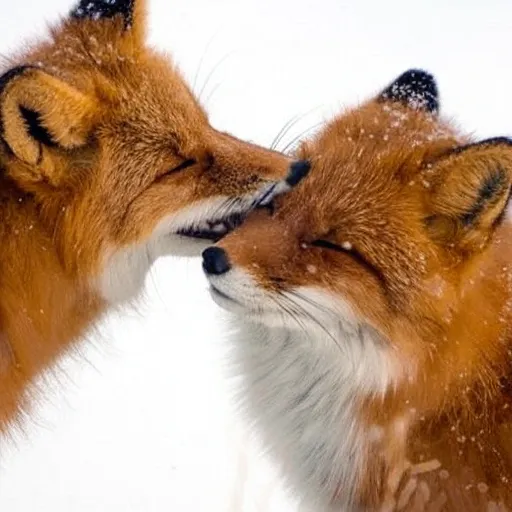
Looks just like the input, pretty good right?
But the compression is lossy. The quality loss becomes obvious with things we’re sensitive to, like faces or fine text.
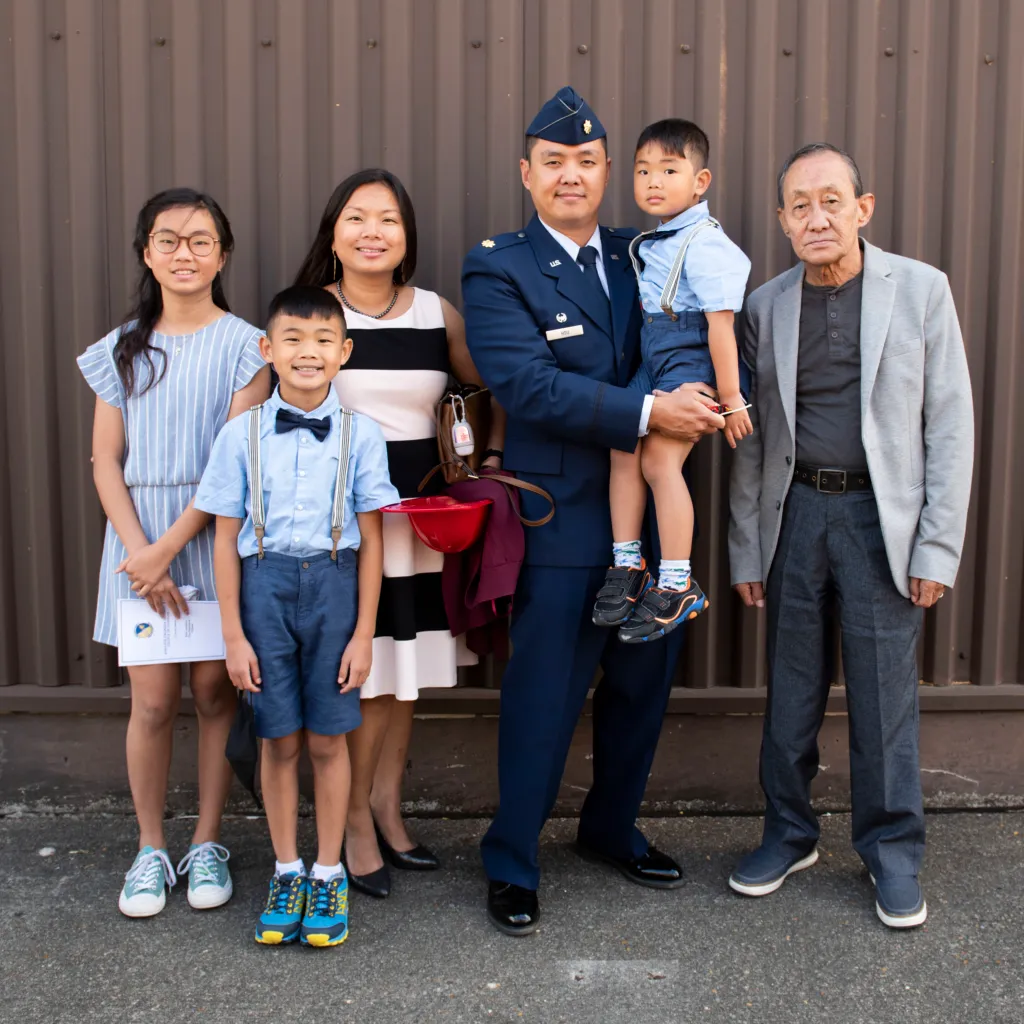
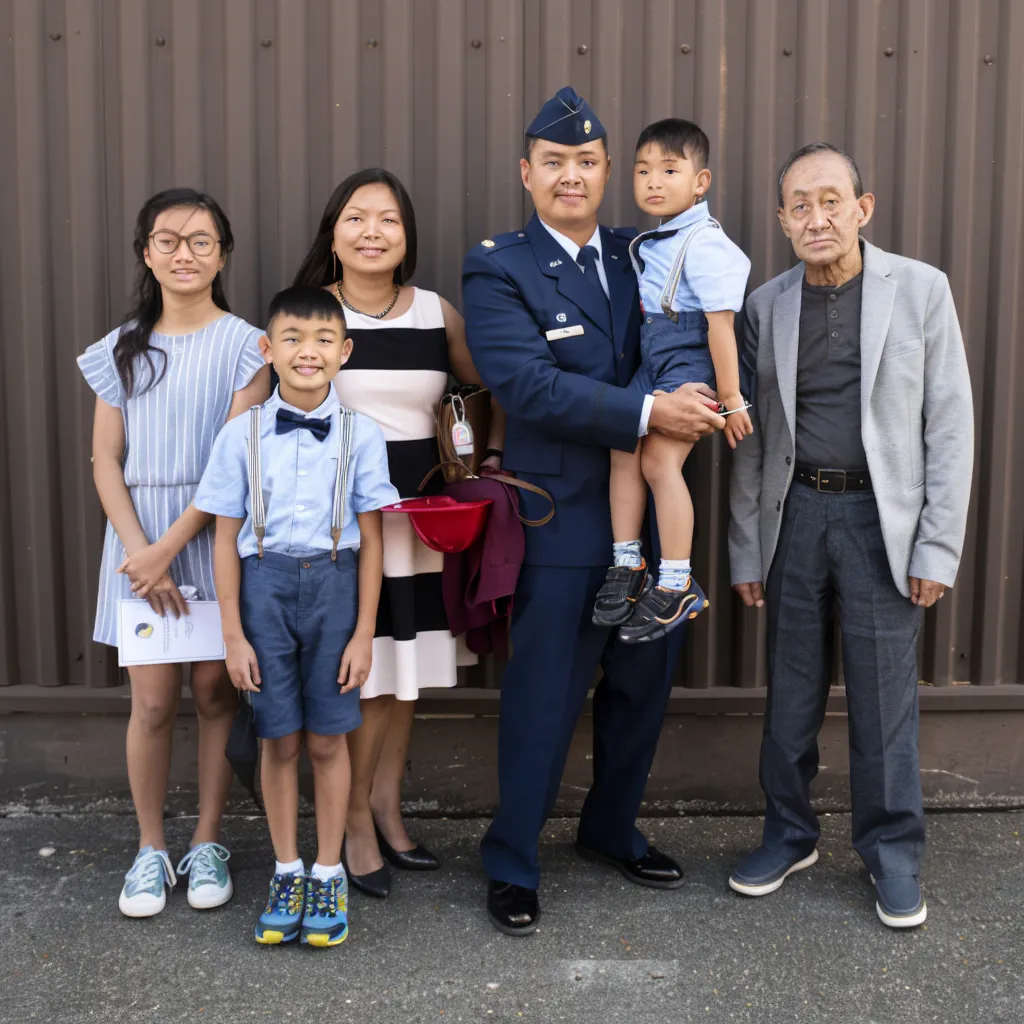
To experiment with the Autoencoder, check out the code in this notebook.
Denoising
To generate an image from noise, we need two more components:
- Text Encoder: Takes a text prompt like “a beautiful mountain landscape” and encodes it into embeddings, numbers which semantically represent the requested image content.
- Diffusion Model: In most cases a transformer which takes a noisy latent and predicts what the clean latent should look like.
Remember, the diffusion model works with compressed latents, not raw pixels — that’s where our Autoencoder comes in to convert between the two.
Let’s see how these components work together in NVIDIA’s Sana model.
Encoding a text prompt
Sana uses Google’s Gemma 2 2B language model as its text encoder. Here’s how to load it:
from transformers import Gemma2Model, GemmaTokenizerFast
import torch

dtype = torch.bfloat16
device = "cuda" if torch.cuda.is_available() else "mps" if torch.mps.is_available() else "cpu"

model_repo = "Efficient-Large-Model/Sana_600M_1024px_diffusers"

tokenizer = GemmaTokenizerFast.from_pretrained(
    model_repo,
    subfolder="tokenizer",
    torch_dtype=dtype
)

text_encoder = Gemma2Model.from_pretrained(
    model_repo,
    subfolder="text_encoder",
    torch_dtype=dtype
).to(device)
Now we can convert text prompts into embeddings. This happens in two steps:
- First tokenize the text into numbers (token IDs),
- then have Gemma2 convert those into meaningful embeddings.
prompt = "A beautiful mountain landscape"

# lower case prompt. see https://github.com/huggingface/diffusers/blob/e8aacda762e311505ba05ae340af23b149e37af3/src/diffusers/pipelines/sana/pipeline_sana.py#L433
prompt = prompt.lower().strip()

# text string to token ids
prompt_tok = tokenizer(
    prompt,
    return_tensors="pt",
    return_attention_mask=True,
    # padding="max_length",
    truncation=True,
    max_length=300,
    add_special_tokens=True
).to(text_encoder.device)

# encode token ids
with torch.no_grad():
    prompt_encoded=text_encoder(**prompt_tok)
Our prompt “A beautiful mountain landscape” becomes 5 tokens (like [2, 235250, 4964, 8180, 15487]), which are then encoded into a [1, 5, 2304] tensor. Each token is now represented as a 2304-dimensional vector capturing its meaning.
Pure Noise
Before denoising, we start with pure noise in latent space.
For a 1024×1024 output image, we need a [1, 32, 32, 32] latent (the AutoEncoder’s 32× compression means 1024÷32 = 32 spatial dimensions):
# batch size 1, 32 channels, height/width of 32 (=1024/32)
latent = torch.randn(
    [1, 32, 32, 32],
    dtype=dtype,
    generator=torch.manual_seed(42)
).to(device)

# fixed constant scaling_factor applied before invoking AutoEncoder
latent_to_PIL(latent / dcae.config["scaling_factor"], dcae)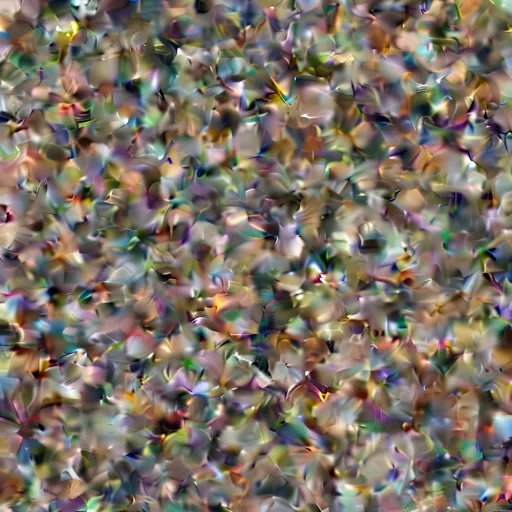
Note: latent_to_PIL is the code we defined above, just wrapped inside a function. Find this and other utility functions in my GitHub repo.
Denoising
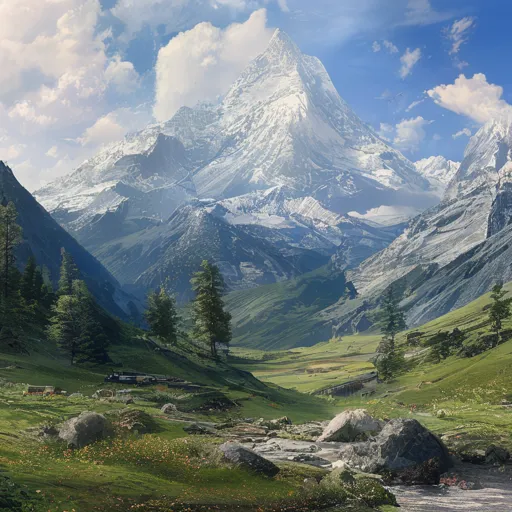
Now we’re getting to the core of it: Turning random noise into “A beautiful mountain landscape.”
Let’s load Sana’s diffusion transformer.
from diffusers import AutoencoderDC, SanaTransformer2DModel

model_repo = "Efficient-Large-Model/Sana_600M_1024px_diffusers"

transformer = SanaTransformer2DModel.from_pretrained(
    model_repo,
    subfolder="transformer",
    torch_dtype=dtype
).to(device)
Denoising is a gradual, iterative process. We start with pure noise and slowly remove it step-by-step.
At each step, the transformer needs three inputs to predict how much noise to remove:
- The encoded text prompt
- The current noisy latent
- The noise level (called the “timestep”)
This step-wise approach is key to diffusion’s success. As you can imagine, going from noise to clean image in just two steps is a lot harder than doing the same thing in 100 steps. You control this trade-off by setting the number of denoising steps.
A typical denoising process starts at timestep 1000 (pure noise) and progresses to timestep 0 (clean image) over 20-50 steps (num_steps in the code below). More steps generally produce better results, but take longer to generate.
prompt = "A beautiful mountain landscape, photorealistic"

# Encode the prompt
prompt_encoded, prompt_atnmask = encode_prompt(prompt, tokenizer, text_encoder)

# Number of steps to take from noise to image
num_steps = 20

# Divide 1000 -> 0 in equally spaced steps
timesteps = torch.linspace(1000, 0, num_steps + 1)

# Noise level. 1.0 -> 0.0 in equally spaced steps
sigmas = timesteps / 1000

latent = torch.randn(
    [1, 32, 32, 32],
    generator = torch.manual_seed(32)
).to(dtype).to(device)

for t, sigma_prev, sigma_next, steps_left in zip(
    timesteps,
    sigmas[:-1],
    sigmas[1:],
    range(num_steps, 0, -1)
):
    # DiT predicts noise
    with torch.no_grad():
        noise_pred = transformer(
            latent,
            timestep=t[None].to(dcae.dtype).to(dcae.device),
            encoder_hidden_states=prompt_encoded,
            encoder_attention_mask=prompt_atnmask,
            return_dict=False
        )[0]

    # Remove noise from latent
    latent = latent + (sigma_next - sigma_prev) * noise_pred

latent_to_PIL(latent / dcae.config["scaling_factor"], dcae)
Let’s break down the key steps:
Setup: We encode our text prompt and create a denoising schedule. The timesteps go from 1000 (pure noise) to 0 (clean image), while sigmas represent the corresponding noise levels (1.0 to 0.0).
Denoising loop: At each step, the transformer predicts how much noise to remove based on the current latent, timestep, and text prompt. We then subtract this predicted noise scaled by the step size (sigma_next - sigma_prev).
Final output: The denoised latent is scaled and decoded back to pixel space, producing our final 1024×1024px image.
This will be our generate function which uses the three core components Text Encoder, Autoencoder, and the Diffusion Transformer to generate an image from pure noise using a text prompt.
The resulting image after 20 denoising steps:
To experiment with these concepts find the code in this notebook.
Flow Matching
Technically, noise_pred represents the “velocity” rather than the predicted noise — Sana uses flow matching instead of traditional diffusion. The core concept remains the same: iteratively transforming noise into images. For the mathematical details, check out Flow With What You Know.
2. Training From Scratch: MNIST
Let’s get into training a model from scratch and start with a simple dataset.
Dataset
MNIST is a collection of handwritten digits, 70,000 28x28px images of handwritten digits in black-and-white. It’s the “Hello World” of machine learning — perfect for our first experiment.

The Compression Challenge. The images are small and that’s a problem for the Autoencoder. The DC-AE has a spatial compression ratio of 32. In other words, converting a 32x32px image to latent space would yield a 1x1 latent — losing much of the detail needed for reconstruction.
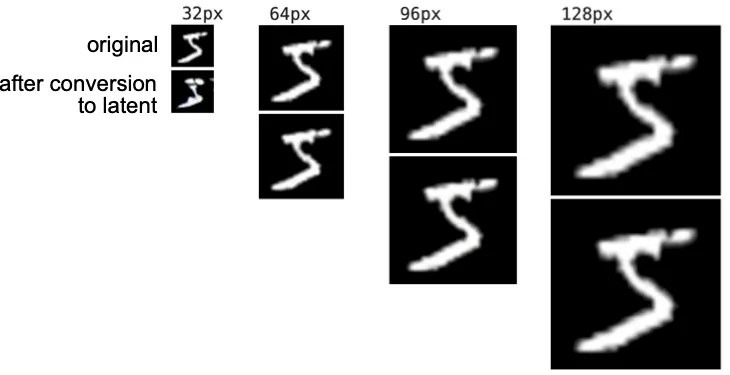
Solution: We upscale MNIST images, I chose to resize the 28x28px images to 64×64 pixels. Increasing the size of the input images somehow defeats the purpose of training on smaller latents. But ok, this model still trains in minutes.
Latent Dataset
To speed up training, I preprocessed all images beforehand. Instead of encoding images on-the-fly during training (which is slow and memory-heavy), I pre-encoded all 70,000 MNIST images into latents and stored them in a HuggingFace dataset.
This way, training works directly with the compressed representations.
Forward Process: Adding Noise
Before we can train our model to denoise images, we need to add noise to clean images first. This creates the noisy training pairs our model will learn from.
# gaussian noise
noise = torch.randn_like(latent)

# noise level, float between 0 and 1
sigma = torch.Tensor([0.1])

# blend clean latent with noise: (1-sigma) * latent + sigma * noise
latent_noisy = (1 - sigma) * latent * dcae.config["scaling_factor"] + sigma * noise
Here’s how different noise levels look:
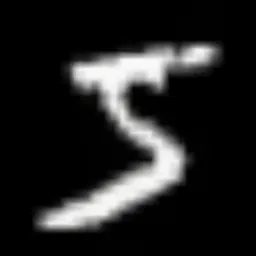
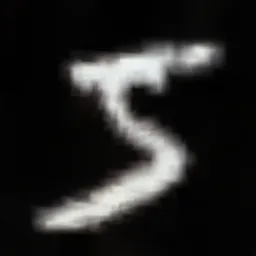
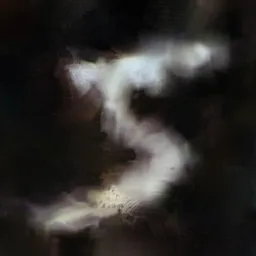
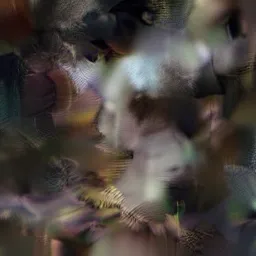

Our add_random_noise function uses this approach, returning the noisy latent along with the noise level (timesteps) and original noise tensor — both needed during training.
def add_random_noise(latents, timesteps=1000):
    # batch size
    bs = latents.size(0)

    # gaussian noise
    noise = torch.randn_like(latents)

    # normal distributed sigmas
    sigmas = torch.randn((bs,)).sigmoid().to(latents.device)

    timesteps = (sigmas * timesteps).to(latents.device)   # yes, `timesteps = sigmas * 1000`, let's keep it simple
    sigmas = sigmas.view([latents.size(0), *([1] * len(latents.shape[1:]))])

    latents_noisy = (1 - sigmas) * latents + sigmas * noise # (1-noise_level) * latent + noise_level * noise

    return latents_noisy.to(latents.dtype), timesteps, noise
Predicting the Reverse Process: Denoising
Apart from some boilerplate code for loading and collating the dataset into batches we now have almost everything we need for training. Except: The actual noise-predicting model — the Diffusion Transformer (DiT).
Setting up the DiT
We instantiate a scaled-down version of Sana’s Diffusion Transformer, with fewer layers and parameters than the full model. For MNIST’s simple black-and-white digits, we don’t need the complexity of a full-scale transformer — this smaller version trains faster while still learning the denoising task effectively.
from diffusers import SanaTransformer2DModel

config = SanaTransformer2DModel.load_config(
    "Efficient-Large-Model/Sana_600M_1024px_diffusers",
    subfolder="transformer"
)

# ModernBERT embeddings dimension
config["caption_channels"] = 768

config["num_layers"] = 12 # vs 28 in full Sana

# hidden size of 384 (6x64) vs 1152 in full Sana
config["num_attention_heads"] = 6
config["attention_head_dim"] = 64

config["cross_attention_dim"] = 384
config["num_cross_attention_heads"] = 6

transformer = SanaTransformer2DModel.from_config(config)
This Diffusion Transformer (DiT) is quite small, just 30.2 million parameters, corresponding to the DiT-S (small) configuration from the original DiT paper Scalable Diffusion Models with Transformers.
Text Encoder Choice. For the text encoder, we’ll use ModernBERT instead of Gemma. ModernBERT is smaller, faster, and more suitable for our lightweight setup.
# Load the text encoder
from transformers import AutoModel, AutoTokenizer
from utils import encode_prompt

te_repo = "answerdotai/ModernBERT-base"

tokenizer = AutoTokenizer.from_pretrained(te_repo, torch_dtype=dtype)
text_encoder = AutoModel.from_pretrained(te_repo, torch_dtype=dtype).to(device)
Predict the Reverse Process
Let’s put it all together: Load a sample, encode the prompt, add noise to the latent, and pass everything to the transformer.
# Load a sample
sample = ds["train"][0]

# Label, e.g. "5"
label = sample["label"]

# Encode the label
prompt_encoded, prompt_atnmask = encode_prompt(
    str(label),
    tokenizer,
    text_encoder
)

# Get the preprocessed Latent
latent = torch.Tensor(sample["latent"]).to(dtype).to(device)

# Scale latent and a random amount of noise
latent = latent * dcae.config["scaling_factor"]
latents_noisy, timestep, noise = add_random_noise(latent)

# Get a noise prediction out of the model
noise_pred = transformer(
    hidden_states = latents_noisy.to(dtype),
    encoder_hidden_states = prompt_encoded,
    encoder_attention_mask = prompt_atnmask,
    timestep=timestep,
).sample
This yields the predicted velocity noise_pred. Since we just initialized our model with random weights, this will be random numbers at first.
In order to teach the model what the prediction should be, we have to calculate a loss and back-propagate it to obtain gradients. The target for rectified flow is the noise minus the clean image (=latent).
import torch.nn.functional as F

# mean squared error of prediction and target
loss = F.mse_loss(noise_pred, noise - latent)

# calculate gradients
loss.backward()
The model learns to predict the velocity field of the rectified flow, which during inference gets reversed to denoise images.
Add a little boilerplate code for loading data in batches, an optimizer, and our training loop is ready!
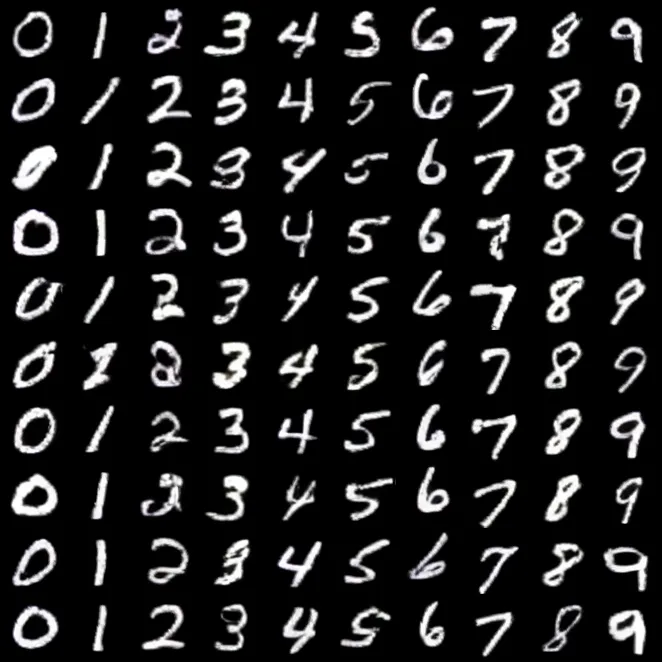
After 200 steps (30 seconds on a 3090) the model generates recognizable digit shapes:

After 10 minutes of training (10 epochs) on MNIST, we generate beautiful 64x64 pixel images of handwritten digits.
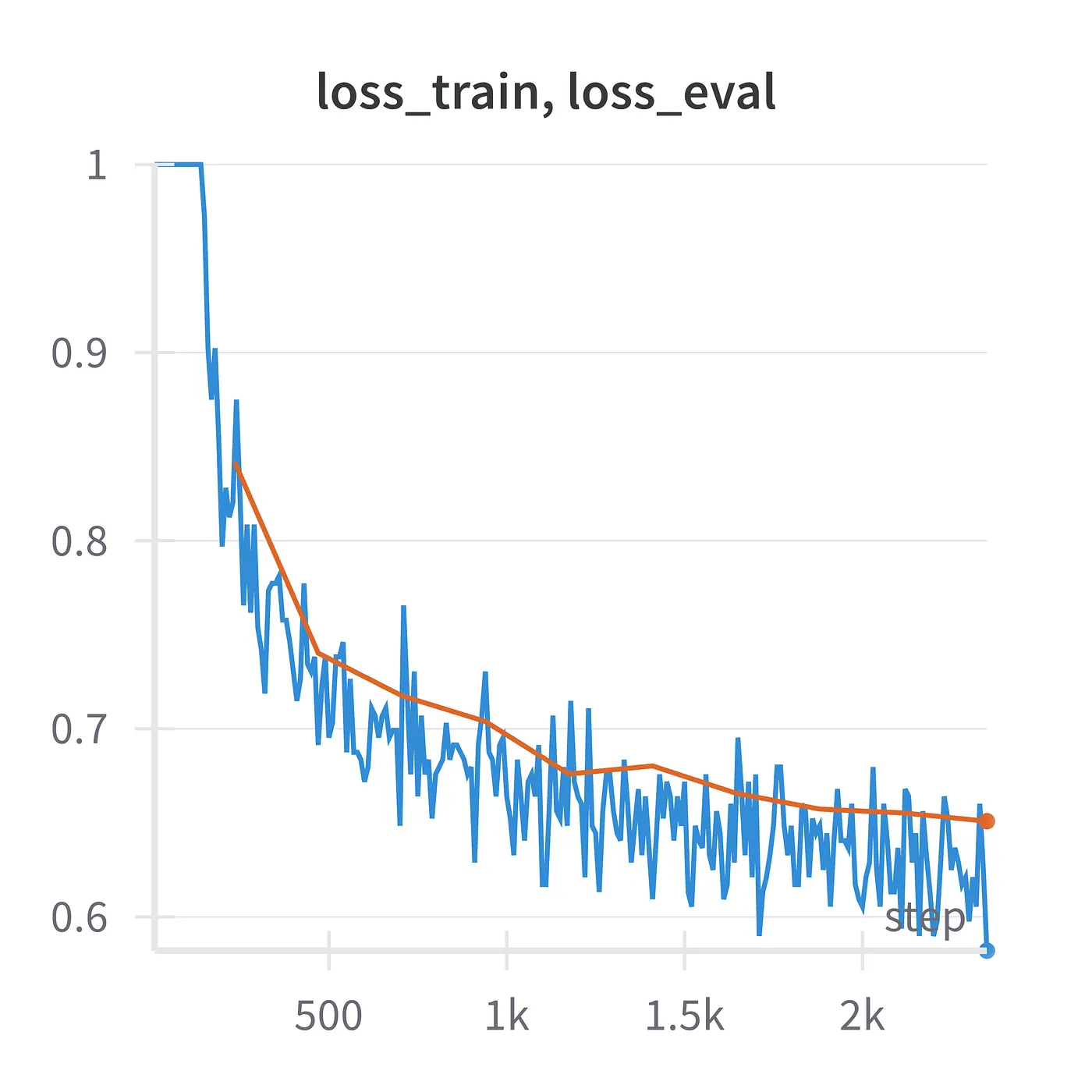
The complete code for this section is available as a notebook and training script. Also check out the wandb logs of this training run if you are curious.
3. Stepping up the game: Fashion MNIST
Let’s move on to a little more complex dataset.
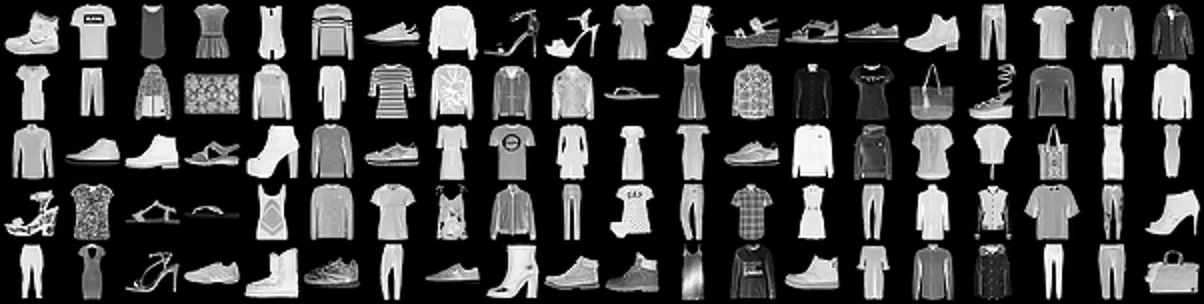
This is Zalando’s Fashion MNIST.
- 70,000 images
- 64x64 pixel
- 10 classes like “T-shirt/top”, “Dress”, “Ankle boot” etc.
Just like MNIST, I prepared a HuggingFace dataset of FMNIST latents. Check out the conversion script here, if you are curious.
DatasetDict({
    train: Dataset({
        features: ['label', 'latent'],
        num_rows: 60000
    })
    test: Dataset({
        features: ['label', 'latent'],
        num_rows: 10000
    })
})
Train
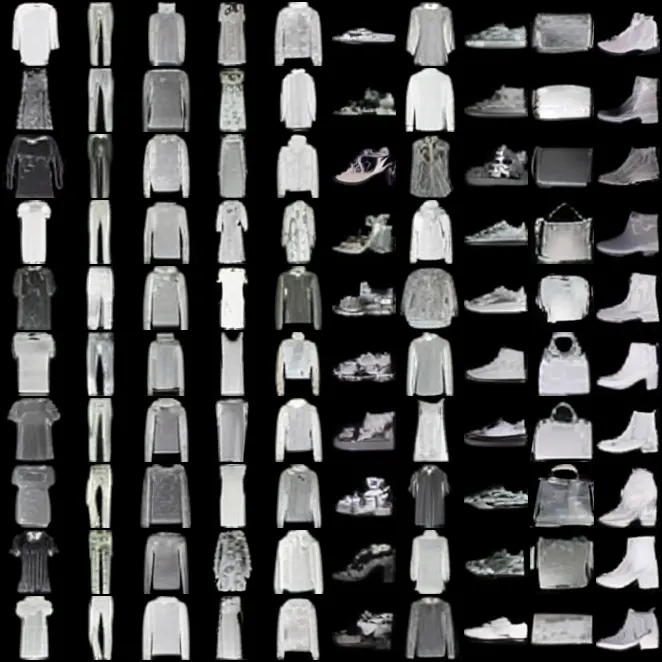
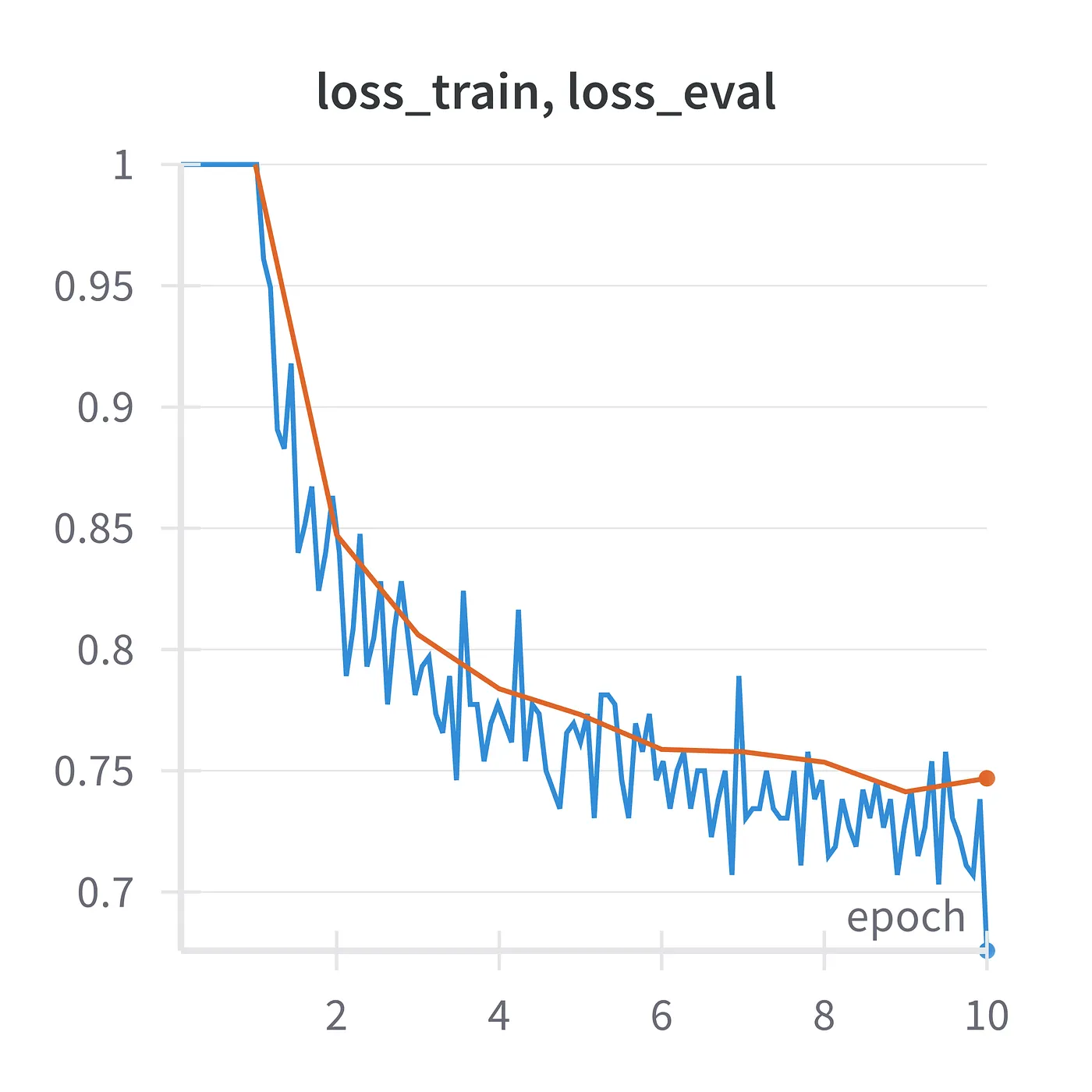
This time we will train on 1–2 word text labels like “T-Shirt” and “Ankle boot”. The rest of the process stays exactly the same. We train a transformer with 30M parameters, learning rate 0.001, batch size 512, 10 epochs.
And this is what we get after 1 epoch:

After 2 epochs:

After 10 epochs (~6 minutes on a NVIDIA RTX 3090):
4. Evaluation with CLIPScore
I love watching loss curves evolve. Let’s add another nice quantitative metric to our training loop: CLIPScore, a metric used to assess how well a caption matches the content of the image.
The torchmetrics package provides convenient access to this metric. I use it like this:
from torchvision.transforms.functional import pil_to_tensor
from torchmetrics.functional.multimodal import clip_score

import requests, torch
from PIL import Image
from io import BytesIO

def pil_clipscore(images, prompts):
    images_tens = [pil_to_tensor(i) for i in images]
    with torch.no_grad():
        scores = clip_score(images_tens, prompts).detach()
    return scores.item()

image = Image.open(
    BytesIO(
        requests.get(
            "https://upload.wikimedia.org/wikipedia/commons/8/83/TrumpPortrait.jpg"
        ).content
    )
)

pil_clipscore([image], ["a friendly face"])
Let’s put that into our training loop.
FMNIST_LABEL_TO_DESC = {
    0: "T-shirt/top", 1: "Trouser", 2: "Pullover", 3: "Dress",
    4: "Coat", 5: "Sandal", 6: "Shirt", 7: "Sneaker", 8: "Bag",
    9: "Ankle boot",
}

def eval_clipscore(num_images = 100):
    prompts = [FMNIST_LABEL_TO_DESC[i % 10] for i in range(100)]
    images = [
        generate(
            prompt,
            # 2x2 latents -> 64x64px images
            latent_dim = [1, 32, 2, 2],
            num_steps = 10,
        )
        for prompt in tqdm(prompts, "eval_clipscore")
    ]

    return pil_clipscore(images, prompts)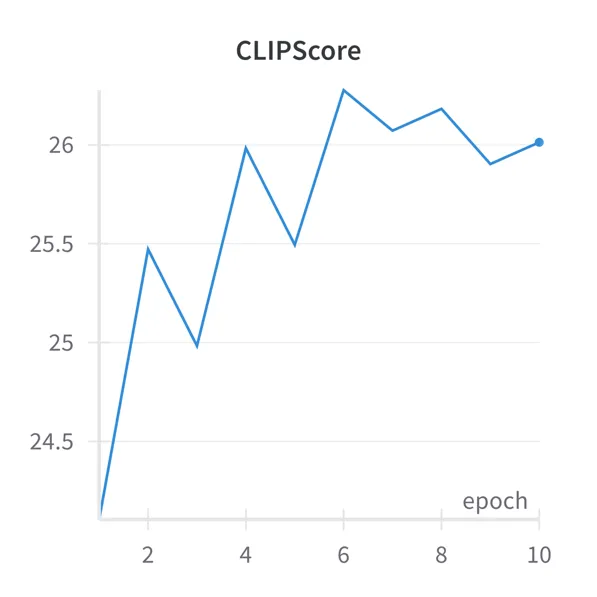
5. Classifier Free Guidance
Before we move on to training on a more complex dataset, I have to introduce a technique which will improve the quality of your images dramatically: Classifier Free Guidance (CFG).
With CFG the model runs twice during inference:
- once with the actual prompt (conditioned)
- and once with an empty prompt “” (unconditioned).
The final prediction is a linear combination of these outputs.
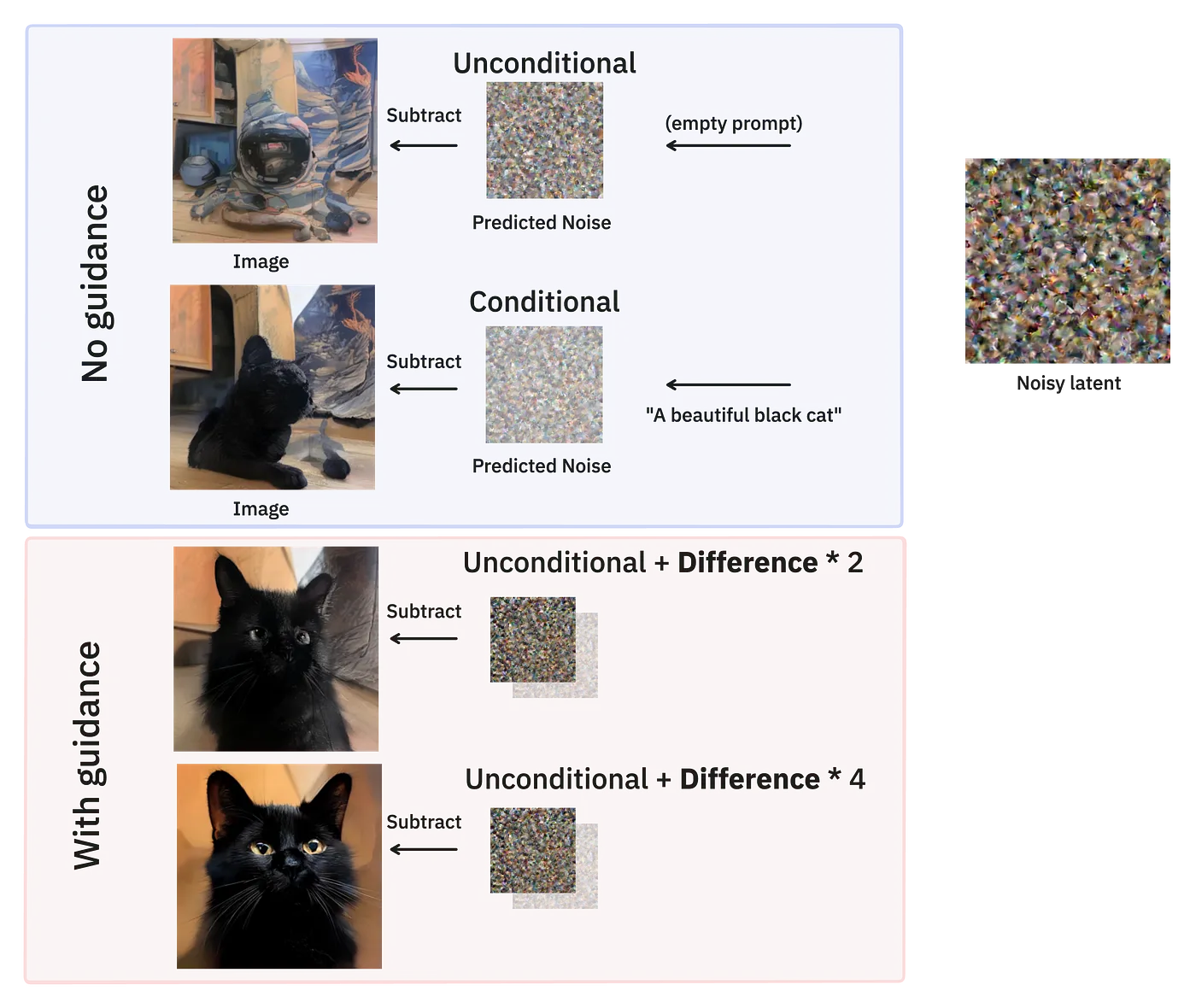
Guidance improves the quality of your images by a lot!
The guidance scale parameter controls the strength of this effect: higher values push the output further from the unconditional distribution toward the conditional one, resulting in samples that better match the prompt.

CFG works by jointly training a single model to handle both prompted and unprompted generation — during training, the conditioning information (text prompts) is randomly dropped with some probability like 10% or 20%, forcing the model to learn unconditional generation alongside conditional generation.
In the provided inference code, this happens when do_cfg is true — the model processes both the real prompt and a negative prompt (often empty), predicts noise for both conditions, then applies the guidance formula to compute the final noise prediction.
def generate(prompt, transformer, tokenizer, text_encoder, dcae, num_steps = 10, latent_dim = [1, 32, 8, 8], guidance_scale = None, neg_prompt = "", seed=None, max_prompt_tok=50):
    device, dtype = transformer.device, transformer.dtype
    do_cfg = guidance_scale is not None

    # Encode the prompt, +neg. prompt if classifier free guidance (CFG)
    prompt_encoded, prompt_atnmask = encode_prompt(
        [prompt, neg_prompt] if do_cfg else prompt,
        tokenizer,
        text_encoder,
        max_length = max_prompt_tok
    )

    # Divide 1000 -> 0 in equally sized steps
    timesteps = torch.linspace(1000, 0, num_steps + 1, device=device, dtype=dtype)

    # Noise level. 1.0 -> 0.0 in equally sized steps
    sigmas = timesteps / 1000

    latent = torch.randn(
        latent_dim,
        generator=torch.manual_seed(seed) if seed else None
    ).to(dtype).to(device)

    for t, sigma_prev, sigma_next, steps_left in zip(
        timesteps,
        sigmas[:-1],
        sigmas[1:],
        range(num_steps, 0, -1)
    ):
        t = t[None].to(device)

        # DiT predicts noise
        with torch.no_grad():
            noise_pred = transformer(
                hidden_states = torch.cat([latent] * 2) if do_cfg else latent,
                timestep = torch.cat([t] * 2) if do_cfg else t,
                encoder_hidden_states=prompt_encoded,
                encoder_attention_mask=prompt_atnmask,
                return_dict=False
            )[0]

        if do_cfg:
            noise_pred_cond, noise_pred_uncond = noise_pred.chunk(2)
            noise_pred = noise_pred_uncond + guidance_scale * (noise_pred_cond - noise_pred_uncond)

        # Remove noise from latent
        latent = latent + (sigma_next - sigma_prev) * noise_pred

    return latent_to_PIL(latent / dcae.config["scaling_factor"], dcae)
To experiment with CFG find the code in this notebook.
6. ImageNet
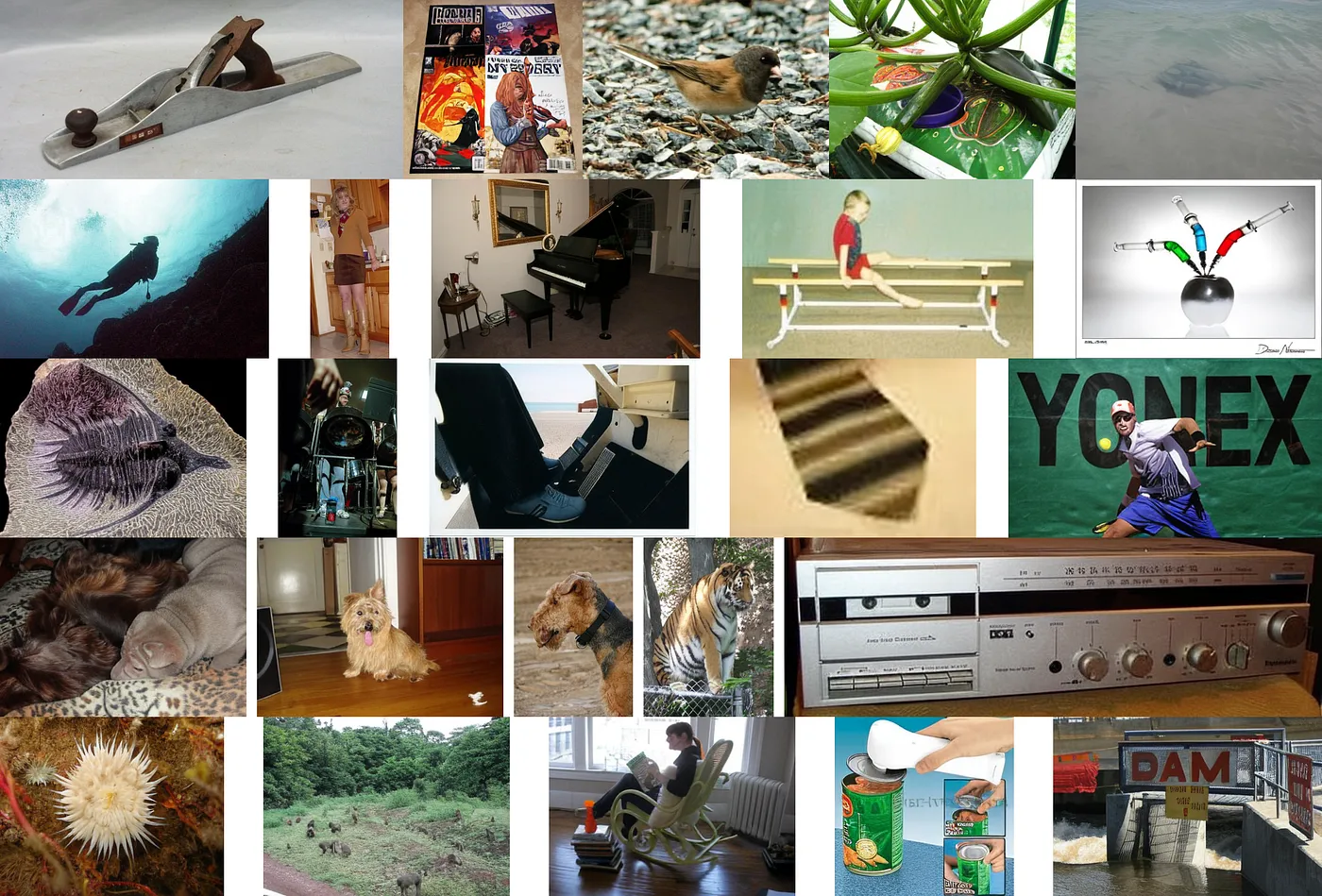
Next, we will train a slightly bigger model on proper image data. We will use ImageNet1k, a dataset of images and photos, still relatively small with ~1.2 million images.
Here’s a random sample.
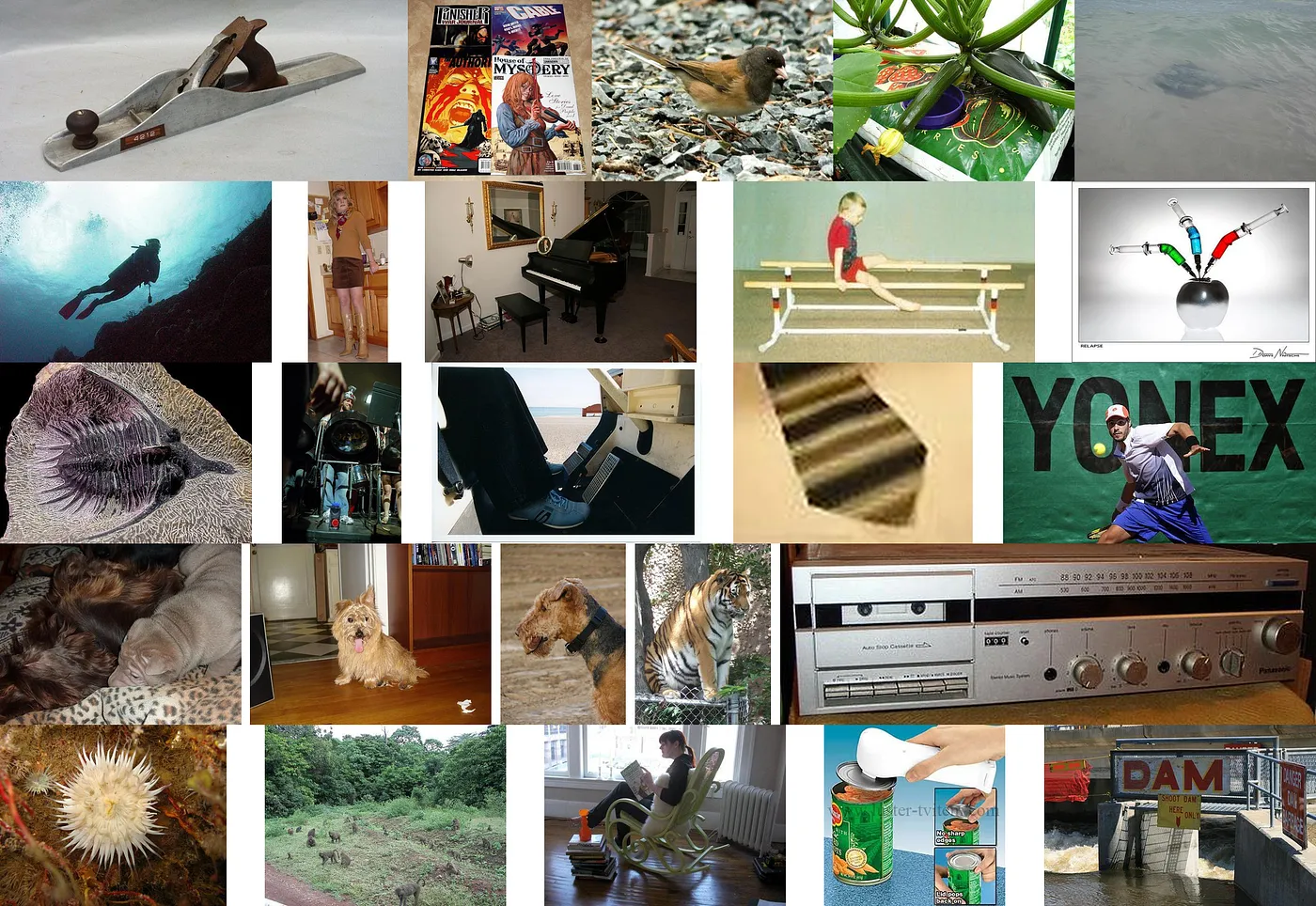
The original ImageNet dataset contains class labels like plane, stingray, and zucchini but no image captions.
Preprocessing
To train on this dataset I generated captions for these images and converted them to latents using the Deep Compression Autoencoder.
I used the Visual Language Models (VLMs) moondream2, smolvlm2, and qwen2.5 VL. If you are curious about the technical details of the recaptioning process, check out my blog post:
Since we are experimenting, I resized the largest edge of each image to max. 256px to save VRAM during training.
import torchvision.transforms as T

# largest edge 256px
def resize_max_dim(image, dim=256):
    return T.Resize(dim, antialias=True)(image)

# DC-AE needs image dimensions to be multiple of 32
def resize_closest_multiple(image, denom=32):
    w, h = image.size
    w = round(w / denom) * denom
    h = round(h / denom) * denom
    return image.resize((w, h))

image = image.convert('RGB') if image.mode != "RGB" else image
image = resize_max_dim(image)
image = resize_closest_multiple(image)

latent = PIL_to_latent(image, dcae)
Latents
We are about to train our diffusion model on latents, not on images. So let’s have a look at how much of image quality we lose by compressing the images to a much smaller latent space.
If you look closer you will notice that the quality of some image elements suffers from (deep) compression, especially text and facial features.

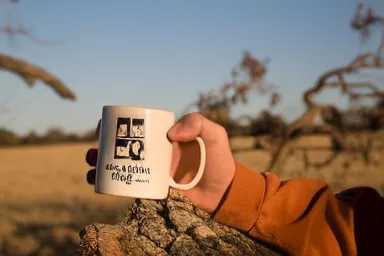


Alright, let’s accept this and go ahead and setup our diffusion transformer.
Diffusion Transformer
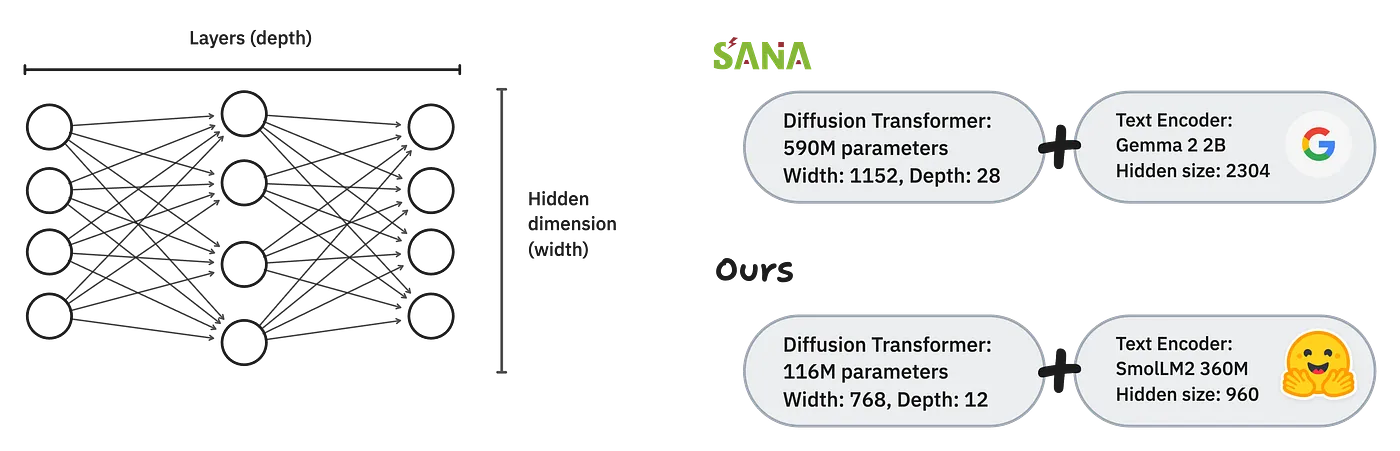
We will be training a tiny diffusion model compared to NVIDIA’s Sana.
Upon its original release, Sana had 590 million parameters, attributed to a hidden dimension of 1152 and 28 transformer blocks. The prompts were encoded using Google’s Gemma 2 2B variant.
We will train a mini version of Sana with 116M parameters and switch the text encoder to something smaller and less corporate: HuggingFace’s SmolLM2.
# Train with reduced precision
dtype = torch.bfloat16
# CUDA device highly recommended
device = "cuda" if torch.cuda.is_available() else "mps" if torch.mps.is_available() else "cpu"

# Load Sana 600M config
config = SanaTransformer2DModel.load_config(
    "Efficient-Large-Model/Sana_600M_1024px_diffusers",
    subfolder="transformer"
)

# Reduce depth
config["num_layers"] = 12

# Reduce width
config["num_attention_heads"] = 12
config["attention_head_dim"] = 64
config["cross_attention_dim"] = 768
config["num_cross_attention_heads"] = 12
config["cross_attention_head_dim"] = 64

# Adapt to hidden size of SmolLM2
config["caption_channels"] = 960

transformer = SanaTransformer2DModel.from_config(config).to(dtype).to(device)
Load Text Encoder and Autoencoder
We will be using the much smaller SmolLM2 with 360M parameters (instead of Gemma 2 2B) and keep the Autoencoder the same.
te_repo = "HuggingFaceTB/SmolLM2-360M"
sana_repo = "Efficient-Large-Model/Sana_600M_1024px_diffusers"

# Load the text encoder and tokenizer
tokenizer = AutoTokenizer.from_pretrained(te_repo, torch_dtype=dtype)
# Pad token is not set by default, use eos
tokenizer.pad_token = tokenizer.eos_token
text_encoder = AutoModel.from_pretrained(te_repo, torch_dtype=dtype).to(device)

# Load Deep Compression AutoEncoder
dcae = AutoencoderDC.from_pretrained(sana_repo, subfolder="vae", torch_dtype=dtype).to(device)
Load dataset of latents
# load g-ronimo/IN1k256-AR-buckets-bfl16latents_dc-ae-f32c32-sana-1.0
# Drop 10% of labels for CFG
dataloader_train, dataloader_eval = load_IN1k256px_AR(
  batch_size=256, label_dropout=0.1
)
The dataset contains the latents of the resized images as well as the captions provided by moondream2, smolvlm2, and qwen2.5 VL. The code for load_IN1k256px_AR is in utils.py which you can find here.
Train!
The very basic training loop without any logging or evaluation:
transformer.train()

optimizer = torch.optim.AdamW(transformer.parameters(), lr=0.0005)

step = 0
epochs = 100

for e in range(epochs):
    for labels, latents in dataloader_train:
        step += 1
        epoch = step/len(dataloader_train)

        # Encode prompts
        prompts_emb, prompts_atnmask = encode_prompt(labels, max_length=50, tokenizer=tokenizer, text_encoder=text_encoder)

        # Scale latent and add random amount of noise
        latents = latents.to(dtype).to(device)
        latents *=  dcae.config["scaling_factor"]
        latents_noisy, timestep, noise = add_random_noise(latents)

        # Get a noise prediction from of the model
        noise_pred = transformer(
            hidden_states = latents_noisy.to(dtype),
            encoder_hidden_states = prompts_emb,
            encoder_attention_mask = prompts_atnmask,
            timestep = timestep,
        ).sample

        optimizer.zero_grad()

        # Calculate gradients
        loss = F.mse_loss(noise_pred, noise - latents)
        loss.backward()

        # Clip gradients
        grad_norm = torch.nn.utils.clip_grad_norm_(transformer.parameters(), 1.0)

        # Update weights
        optimizer.step()

        if step % 10 == 0:
            print(f"step {step} epoch {epoch:.2f} loss: {loss.item()}")
After 1 epoch (1200 steps, ~25 minutes):

After 10 epochs (~12,000 steps):

After 50 epochs (~60,000 steps):

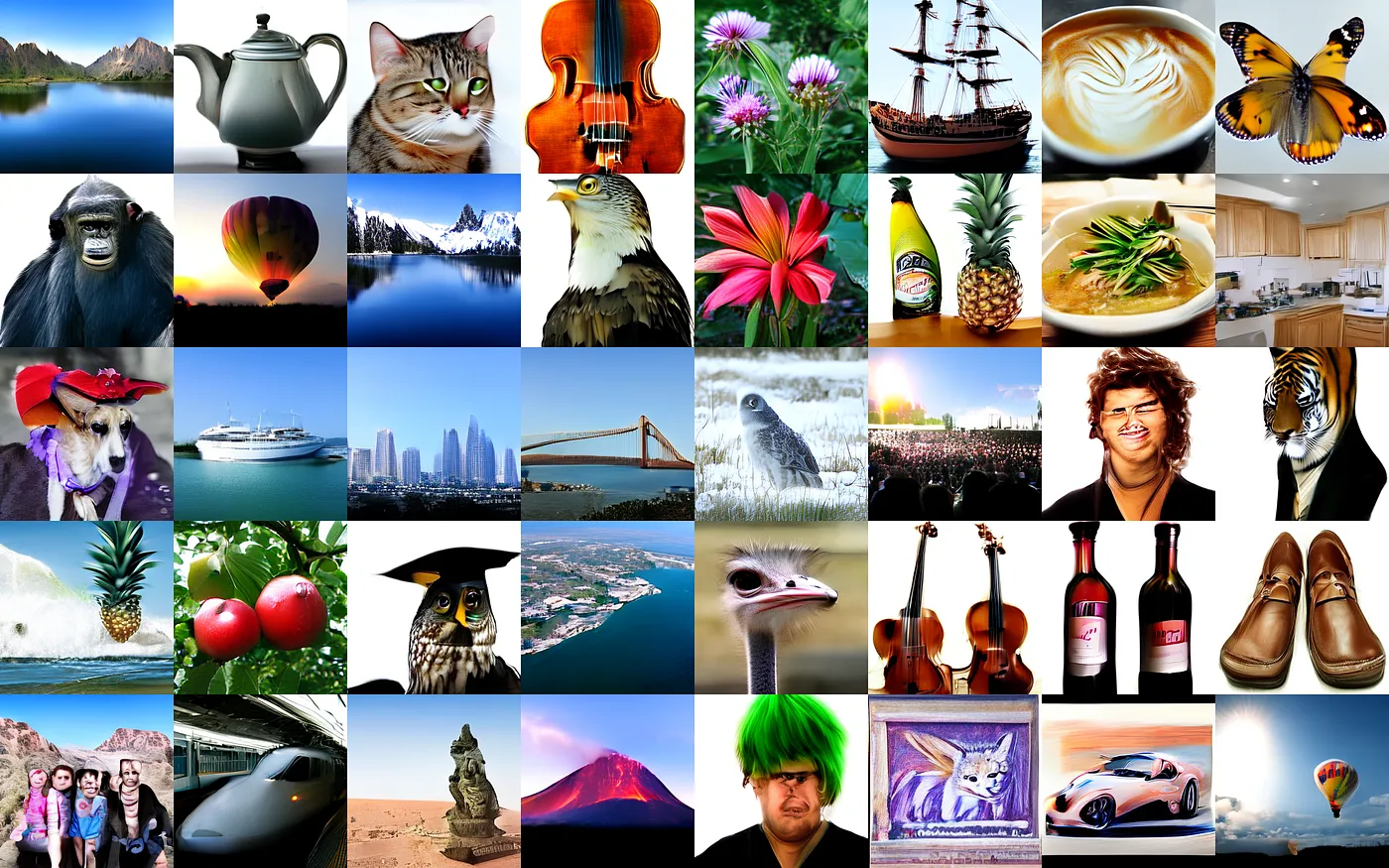
After 100 epochs (~120,000 steps, 42 hours):

Note: 100% cherry-picked prompts were used to generate these images, subset of Google’s PartiPrompts.
Training this 116M model from scratch took 42 hours on a NVIDIA RTX PRO 6000. This would cost ~$81 on RunPod for example.
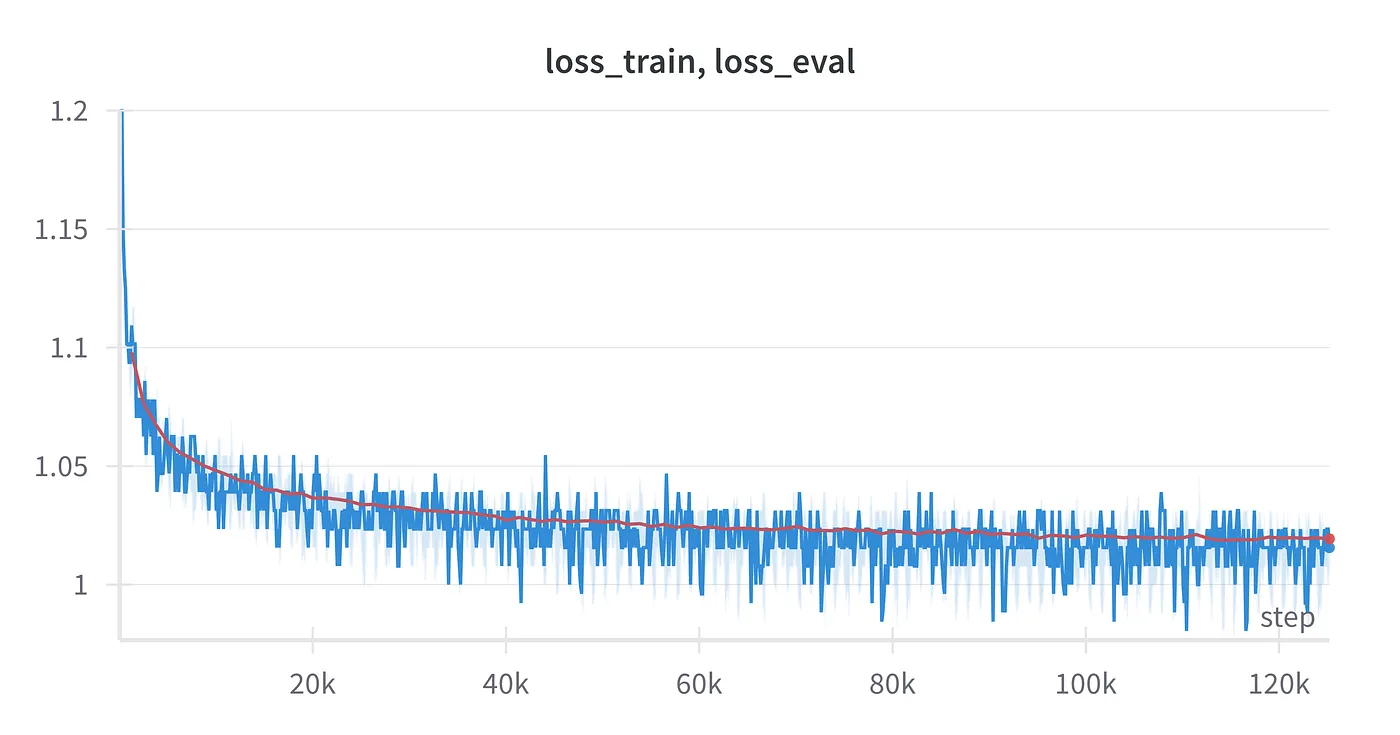
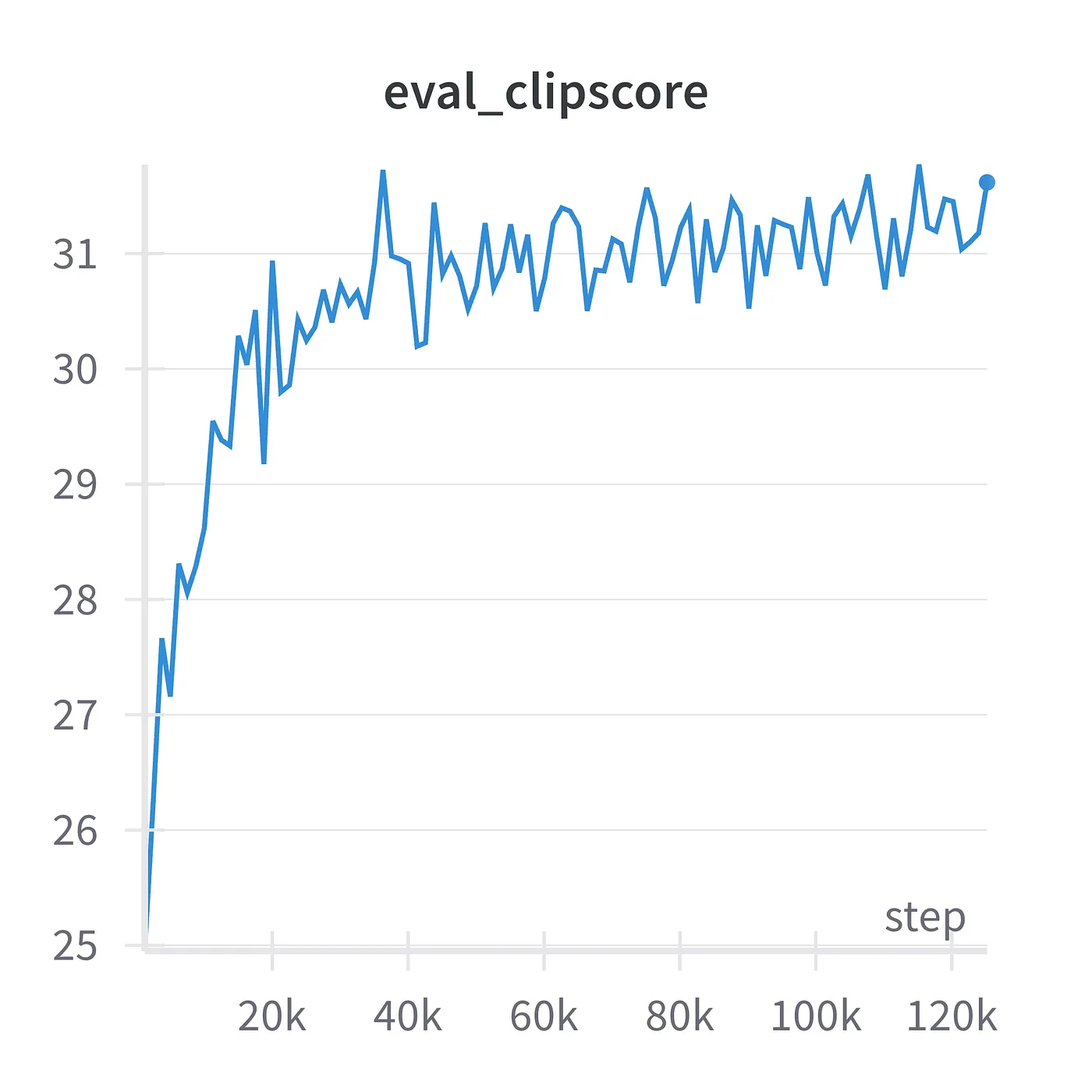
Obviously, this model’s performance is poor. But it’s a tiny model (116M parameters) trained on a tiny dataset (1.2M images).
What’s next?
If you are curious about the process and technical details, check out the minimal code in my GitHub repo.
If you want to step this up and train on larger datasets and multiple GPUs, check out my previous blog posts:
Summary
Reversing diffusion allows us to transform random noise into images through an iterative denoising process, guided by text prompts.
Key Components
Diffusion requires three essential components:
- Autoencoder: Compresses images to/from latent space (working with compressed representations rather than raw pixels)
- Text Encoder: Converts text prompts into numerical embeddings
- Diffusion Transformer: Predicts and removes noise iteratively
Training Progression
We trained models on increasingly complex datasets:
- MNIST (handwritten digits): Simple 28x28 black-and-white images. Training took 10 minutes on a GPU to generate recognizable digits.
- Fashion-MNIST: 64x64 images of clothing items like t-shirts, dresses, shoes. Training took about 6 minutes to produce decent results.
- ImageNet: Real photographs with 1.2 million images. The dataset was recaptioned using vision-language models and used to train a 116M parameter model (much smaller than commercial models) over 100 epochs, taking 42 hours.
Key Techniques
- Classifier Free Guidance (CFG): Dramatically improves image quality by running the model twice (with and without prompts) and combining outputs
- CLIPScore evaluation: Quantitative metric to assess how well generated images match their text descriptions
- Latent space training: Working with compressed image representations to save memory and computation
This was a learning exercise rather than creating state-of-the-art models. The performance of the models trained here is limited by the model size and dataset compared to commercial diffusion models that cost millions to train.
I tried and I am still trying to train bigger and better models, just to see how far I can get. All code and fails are documented in my GitHub Repo.
🔗 GitHub — geronimi73/Hana: A Sana-like text-to-image model trained from scratch.