Smart Background Removal in the Browser
A depth-based image editor with transformers.js and Depth Anything
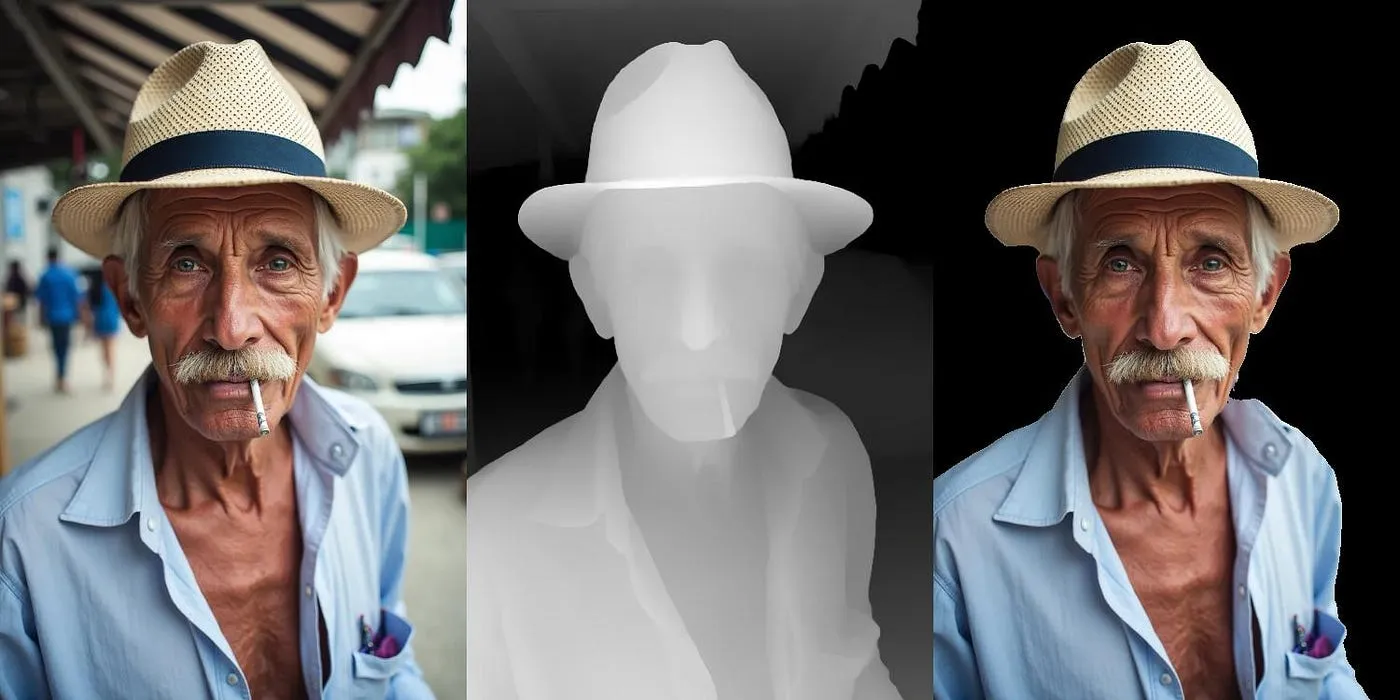

Most background removal tools make simple yes/no decisions about what to keep. Using “depth” information, users can choose exactly how much to remove. Here’s how to build a simple background removal app that runs in the browser.
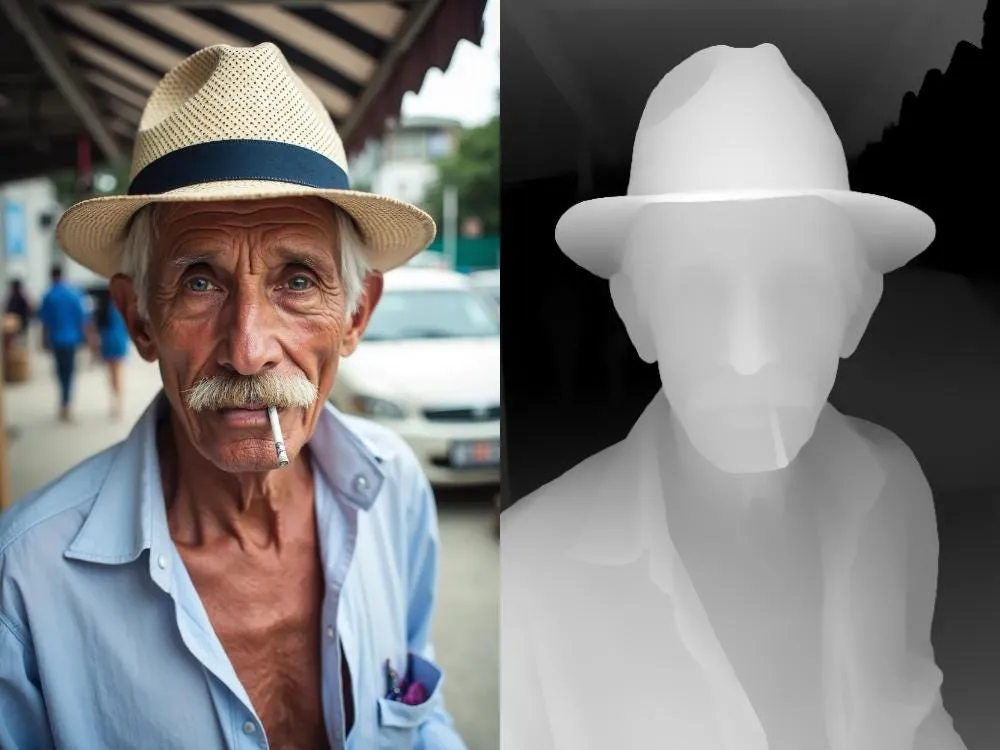
Instead of classifying pixels as foreground or background, a depth map reveals the (estimated) distance of each pixel from the camera. This lets users select which parts of the image to keep based on distance.
Depth Anything V2 is a small enough neural network to run in the browser, on your own device. You get two benefits: your data stays private, and it runs faster — especially if you have a GPU. This approach to background removal is one of several AI-powered features I’ve implemented in snapfiddle, a browser-based image editor.
In this post, I’ll break down how to build the depth estimation component. Try the standalone demo or as part of snapfiddle’s suite of editing tools.
Let’s build the background remover step by step:
- Set up transformers.js
- Load Depth Anything V2 in the browser
- Generate depth maps from images
- Use depth to remove backgrounds
You can find the complete Next.js app at depth2.vercel.app and the code on GitHub.
Setting up transformers.js
transformers.js makes loading models easy. First, install the package:
npm i @huggingface/transformersWhen using Next.js, make sure to adapt next.config.js to disable Node.js packages we don’t need in the browser:
/** @type {import('next').NextConfig} */
const nextConfig = {
    // (Optional) Export as a static site
    // See https://nextjs.org/docs/pages/building-your-application/deploying/static-exports#configuration
    output: 'export', // Feel free to modify/remove this option
    // Override the default webpack configuration
    webpack: (config) => {
        // See https://webpack.js.org/configuration/resolve/#resolvealias
        config.resolve.alias = {
            ...config.resolve.alias,
            "sharp$": false,
            "onnxruntime-node$": false,
        }
        return config;
    },
}
module.exports = nextConfig
The transformers.js documentation provides more examples for Next.js integration.
Loading the model
Model loading with transformers.js is simple. The pipeline API handles model downloading, caching, and initialization in a few lines of code:
import { pipeline } from '@huggingface/transformers'

// ..
// .. inside a function body, eg. a click handler
const depth_estimation = await pipeline(
  "depth-estimation",
  "onnx-community/depth-anything-v2-small",
  { device: "wasm" },
)
By default, inference runs on CPU using WebAssembly. For GPU acceleration, change the device parameter to “webgpu” if your browser supports it.
This streamlined approach contrasts with SAM2’s deployment in my previous blogpost, where manual ONNX conversion and runtime setup were required.
Depth Estimation
Depth Anything V2 comes in several sizes: small (24.8M parameters), base (97M), large (335M), and giant (1.3B). We will use the small version of Depth Anything V2. It’s fast, accurate enough, and released under a license that permits commercial use.
Let’s walk through the steps needed to generate a depth map:
- Draw the input image to a canvas
- Convert it to transformers.js format
- Run inference and display results
// Draw input image onto a canvas
const image = imgEl.current;
const imageCanvas = document.createElement('canvas');
imageCanvas.height = image.naturalHeight
imageCanvas.width = image.naturalWidth
const imageCtx = imageCanvas.getContext("2d");
imageCtx.drawImage(image, 0, 0);

// Convert convas to transformers.js RawImage
const imageRawImage = RawImage.fromCanvas(imageCanvas)

// Send RawImage as input to pipeline, result is also a RawImage
const { depth } = await depth_estimator( imageRawImage );

// depth map RawImage -> Canvas
const depthCanvas = depth.toCanvas()

// Draw depth map onto output canvas
const outputCanvas = outputCanvasEl.current
outputCanvas.height = imageCanvas.height
outputCanvas.width = imageCanvas.width
const outputCtx = outputCanvas.getContext("2d");
outputCtx.drawImage(depthCanvas, 0, 0)
The depth-estimation pipeline returns a RawImage object, which wraps the underlying tensor data. You can convert RawImage to and from an HTML5 canvas or other formats, see the transformers.js docs for RawImage for a complete list.
Use Depth to remove Background
The depth map gives each pixel a value from 0 to 255. Lower numbers mean far from the camera, higher values close to the camera. We can remove the background by picking a depth cutoff value — anything further away gets removed.
// Choose a depth cutoff to distinguish foreground and background

// Calculate average of all values in the depth map
const cutoff = Math.round(depth.data.reduce((partialSum, a) => partialSum + a, 0) / depth.data.length)// Mask background by setting alpha channel to zero

const outputCanvas = outputCanvasEl.current
const outputCtx = outputCanvas.getContext("2d");
outputCanvas.height = imageCanvas.height
outputCanvas.width = imageCanvas.width
outputCtx.drawImage(image, 0, 0)

// Set alpha channel to 0 to mask background
const pixelData = outputCtx.getImageData(0, 0, outputCanvas.width, outputCanvas.height);
for (let i = 0; i < depth.data.length; ++i) {
  pixelData.data[4 * i + 3] = depth.data[i] > cutoff ? 255 : 0
}
outputCtx.putImageData(pixelData, 0, 0);
The average depth works as a starting point, but each image is different. Add a slider for example to let users pick the best cutoff for their image.
Tip: Run the model in a Web Worker to keep your app responsive. This prevents the main thread from blocking during model inference. See the code on GitHub on how to implement this.
Summary
We built a depth-based background removal tool that:
- Lets you choose exactly how much to remove based on the estimated distance
- Runs in your browser to keep your data private
- Uses your GPU when available
The code is short and simple (less than 100 lines of code) thanks to transformers.js. Try it yourself at depth2.vercel.app and explore the source code in the GitHub repository.