VLM Inference on multiple GPUs
Parallel Image Captioning with SmolVLM2, Moondream2, Qwen2.5-VL and DDP
Got millions of images without (proper) labels? This article provides guidance on how to caption large image datasets using the latest Vision Language Models (VLMs) efficiently on a single or multiple GPUs and what performance to expect.
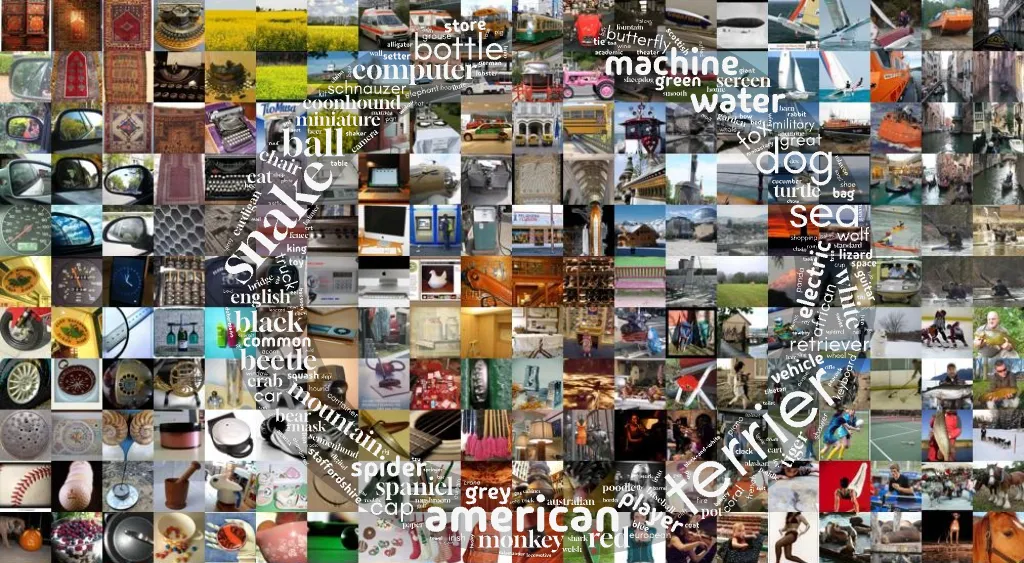
I recently started training a diffusion model from scratch (blog post soon-ish). As a challenge within a challenge, I found that captioning these huge image datasets can be incredibly time-consuming, particularly when using a single GPU.
In this blog post, I’ll walk you through the process of captioning large image datasets.
- I’ll start with captioning images one at a time,
- then move on to batch captioning,
- and finally, implement batch captioning across multiple GPUs.
I tested three different vision language models (VLMs):
- Hugging Face’s SmolVLM2 2.2B
- Moondream 2B
- Qwen2.5-VL 3B
Along the way, I’ll share code snippets, random wisdom, and the performance numbers I observed.
If you are in a hurry and want to see the code right away, head over to my GitHub folder, start with the notebook.
Part 1: One image at a time
The first step in the process is to caption individual images.
Requirements
We need the latest version of transformers and a few other packages to get started.
pip3 install git+https://github.com/huggingface/transformers.git
pip3 install flash-attn num2words torchvision datasets accelerate torchmetrics Pillow==9.4.0
Load dataset: ImageNet
As an example dataset we will explore ImageNet. The ImageNet dataset is a collection of ~1.3 million images. Each image comes with a class label like minibus, space shuttle, Old English Sheepdog, toilet seat, or dog sled (5 random picks out of the 1000 different classes in this dataset).
from datasets import load_dataset

ds = load_dataset("ILSVRC/imagenet-1k", streaming=True, trust_remote_code=True)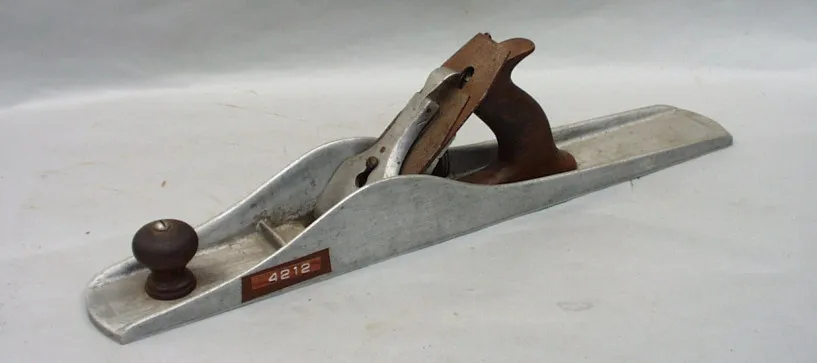
Load VLM: SmolVLM2
I assume you are working with an NVIDIA GPU but this will also run on Apple silicon if you replace cuda with mps.
import torch
from transformers import AutoProcessor, AutoModelForImageTextToText

device = "cuda"
dtype = torch.bfloat16
repo = "HuggingFaceTB/SmolVLM2-2.2B-Instruct"

processor = AutoProcessor.from_pretrained(repo)
model = AutoModelForImageTextToText.from_pretrained(
    repo,
    torch_dtype=dtype,
    _attn_implementation="flash_attention_2",
).to(device)
Note: Make sure to load the model with _attn_implementation="flash_attention_2", this speeds things up a lot!
Caption!
VLMs are instruct models, this means we will assemble a conversation with the model where we provide an image and a question. The code simply follows the SmolVLM docs and blog post to implement this.
# Construct a conversation
conversation = [
    dict(role="user",
         content=[
             dict(type="image", image=img),
             dict(type="text", text="Describe the image please"),
         ])
]

# Tokenize input
inputs = processor.apply_chat_template(
    conversation,
    add_generation_prompt=True,
    tokenize=True,
    return_dict=True,
    return_tensors="pt",
).to(model.device, dtype=dtype)

# Query model
output_ids = model.generate(**inputs, max_new_tokens=128)

# Remove input tokens from response
output_ids = output_ids[:, inputs["input_ids"].size(1):]

# Decode tokens to text
outputs = processor.batch_decode(output_ids, skip_special_tokens=True)

print(outputs[0].strip())
The image depicts a vintage hand plane, which is a woodworking tool used for shaping wood. The plane is made of metal, specifically aluminum, and has a rectangular shape with a slightly curved body. The blade of the plane is visible and appears to be made of a dark, possibly steel material. The blade is held in place by a metal lever, which is located on the right side of the plane. This lever is used to adjust the depth of the cut.
The plane has a wooden handle, which is attached to the right side of the plane. The handle is dark brown and appears to be made of a material like ….
That’s a good start. Depending on your needs and creativity you would maybe change the prompt. In my case:
- Ask for a short caption
- Provide a hint about the image content to the model
Let’s try that again with a refined prompt.
prompt = """The image shows a hand plane. Please come up with a short
image caption, list and describe the main objects shown in the image.
Keep the caption short, one sentence only."""

... (same as above)
A vintage hand plane with a wooden handle and a metal blade, marked with the number 4212.
🚀🚀
Let’s put that into a function and add a loop going through the dataset.
Final code: Iterate and caption
from torchvision import transforms as T

# Let's put the captioning part into a function
def caption_smolvlm(img, prompt):
    conversation = [
        dict(role="user",
             content=[dict(type="image", image=img), dict(type="text", text=prompt)]
        )
    ]

    inputs = processor.apply_chat_template(
        conversation,
        add_generation_prompt=True,
        tokenize=True,
        return_dict=True,
        return_tensors="pt",
    ).to(model.device, dtype=dtype)

    output_ids = model.generate(**inputs, max_new_tokens=128)
    output_ids = output_ids[:, inputs["input_ids"].size(1):]
    outputs = processor.batch_decode(output_ids, skip_special_tokens=True)

    return outputs[0].strip()

# Be nice to the small VLM
prompt_template = """The image shows a {class_name}. Please come up
with a short image caption, list and describe the main objects shown
in the image. Keep the caption short, one sentence only."""

for d in ds["train"]:
    # 1) Resize image to save VRAM
    # 2) Extract classname. d["label"] is a number (e.g. 23) -> convert to string ('vulture')
    image = T.CenterCrop(256)(T.Resize(256)(d["image"]))
    class_name = in_labels[d["label"]]

    # Insert class name into prompt
    prompt = prompt_template.format(class_name=class_name)

    # Query model
    caption = caption_smolvlm(image, prompt)
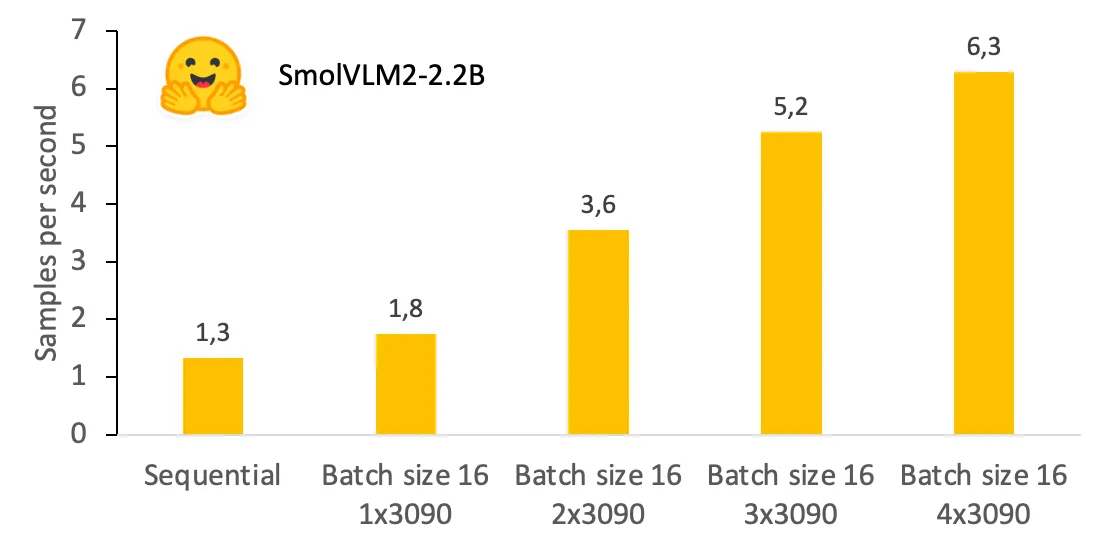
Ok, this runs at a speed of 1.3 samples per second on an NVIDIA GeForce RTX 3090. At that speed, processing the entire ImageNet (1.33 million images) would take 12 days.
Note: The exact numbers reported here will vary, even on the same type of GPU. I’ve run the same code on different RunPod instances and saw differences of 10–20% on different RTX3090 pods. Probably due to different machine setups (CPU, PCIe lanes, power caps?).
Let’s make this a little faster.
Part 2: Batch Captioning
To speed up the captioning process, we move on to batch captioning. This involves processing multiple images simultaneously, which should reduce the overall time required.
First, we have to modify caption_smolvlm() to pass multiple conversations to the VLM:
def batch_caption_smolvlm2(images, prompts):
    # Construct a list of conversations, each with one image and prompt
    conversations = [
        [dict(role="user", content=[dict(type="image", image=img),dict(type="text", text=prompt)])]
        for img, prompt in zip(images, prompts)
    ]

    # Preprocess inputs
    inputs = processor.apply_chat_template(
        conversations,
        add_generation_prompt=True,
        padding=True,
        tokenize=True,
        return_dict=True,
        return_tensors="pt",
    ).to(model.device, dtype=torch.bfloat16)

    # Query model and remove input tokens
    output_ids = model.generate(**inputs, max_new_tokens=128)
    output_ids=[ tok_out[len(tok_in):] for tok_in, tok_out in zip(inputs["input_ids"], output_ids) ]

    generated_texts = processor.batch_decode(
        output_ids,
        skip_special_tokens=True
    )

    return [t.strip() for t in generated_texts]
Next, we use a DataLoader for assembling the batches and resizing the images using multiple CPU threads.
from torchvision import transforms as T
from torch.utils.data import DataLoader

# A collate function converts a list of items to a batch
def collate_fn(items):
    return [
        [T.Resize(256)(i["image"]) for i in items],
        [in_labels[i["label"]] for i in items],
    ]

# DataLoader's job is to prepare and preload batches of data
dataloader = DataLoader(
    ds["train"],
    shuffle=False,
    collate_fn=collate_fn,
    batch_size=16,
    num_workers=2,      # Use 2 threads for prefetching
    prefetch_factor=10  # Each thread will prefetch 10 samples
)

prompt_template = """The image shows a {class_name}. Please come up
with a short image caption, list and describe the main objects shown
in the image. Keep the caption short, one sentence only."""

for images, class_names in tqdm(dataloader):
    # Assemble prompts by inserting the actual class name into the template
    prompts = [
        prompt_template.format(class_name=class_names[i])
        for i in range(len(images))
    ]

    # Prompt model with entire batch of images
    captions = batch_caption_smolvlm2(images, prompts)
This speeds things up by ~30%. On a RTX3090, this captions at a speed of around 1.75 images per second. Processing the entire dataset would still take 9 days. We will not get around using multiple GPUs to do this in parallel.
Part 3: Batch Captioning on Multiple GPUs
Final optimization: Use multiple GPUs in parallel. This involves using the torch.distributed package to start multiple processes and distribute the dataset.
Skip this if you are familiar with torch.distributed
If you are not familiar with torch.distributed, this is what my template for multi GPU processing looks like. In essence, we need a few lines of initializing the inter-process communication and use a DistributedSampler which assigns parts of the dataset to each thread (called rank).
import torch
import torch.distributed as dist
from datasets import Dataset
from torch.utils.data import DataLoader
from torch.utils.data.distributed import DistributedSampler
from tqdm import tqdm

def process(rank, is_master, world_size, batch_size=8):
    print(f"Hello from rank {rank}")

    # Create a dummy dataset
    ds = Dataset.from_list(
        [{"data": f"data {i}"} for i in range(100)]
    )

    # Distributed data loader without shuffling
    def collate_fn(items):
        data_list = [item["data"] for item in items]
        return data_list

    sampler = DistributedSampler(ds, shuffle=False)

    dataloader = DataLoader(
      ds, sampler=sampler, collate_fn=collate_fn, batch_size=batch_size
    )

    # Process your data
    for batch in tqdm(dataloader, desc=f"rank {rank}"):
        # Do something useful
        pass

if __name__ == '__main__':
    dist.init_process_group(backend='nccl')

    seed = 42
    torch.manual_seed(seed)

    world_size = dist.get_world_size()
    rank = dist.get_rank()
    is_master = rank == 0
    torch.cuda.set_device(rank)

    process(rank, is_master, world_size)

    dist.destroy_process_group()
Run the code using torch.distributed with
torchrun --nproc-per-node 2 script.py
The parameter nproc-per-node specifies the number of GPUs on your system.
Let’s adapt the minimal distributed processing template above and incorporate the batch_caption_smolvlm2 function for batch processing of ImageNet samples:
def process(rank, is_master, world_size):
    # Setup
    device = "cuda"
    dtype = torch.bfloat16
    batch_size = 8

    # Suppress tokenizers warning
    os.environ["TOKENIZERS_PARALLELISM"] = "false"

    # Load ImageNet1k dataset
    ds = load_dataset(
      "ILSVRC/imagenet-1k", trust_remote_code=True
    )["train"]

    # Load ImageNet1k labels
    in_labels = load_imagenet_labels()

    # DistributedSampler to split the dataset across GPUs
    sampler = DistributedSampler(ds, shuffle=False)

    # Prepare DataLoader
    def collate_fn(items):
        # 1) resize image to save VRAM
        # 2) extract classname. d["label"] is a number (e.g. 23)  -> string ('vulture')
        return [
            [T.CenterCrop(256)(T.Resize(256)(i["image"])) for i in items],
            [in_labels[i["label"]] for i in items],
        ]

    dataloader = DataLoader(
        ds,
        sampler=sampler,
        collate_fn=collate_fn,
        batch_size=batch_size,     # 8 samples per batch, maximum which fits on a 24GB VRAM GPU
        num_workers=2,    # Use 2 threads for prefetching
        prefetch_factor=10  # Each thread will prefetch 10 samples
    )

    prompt_template = """The image shows a {class_name}. Please come up
with a short image caption, list and describe the main objects shown
in the image. Keep the caption short, one sentence only."""

    for images, class_names in tqdm(dataloader, f"GPU{rank}"):
        # insert class name into prompts
        prompts = [
            prompt_template.format(class_name=class_names[i])
            for i in range(len(images))
        ]

        captions = batch_caption_smolvlm2(images, prompts)

if __name__ == '__main__':
    dist.init_process_group(backend='nccl')

    seed = 42
    torch.manual_seed(seed)

    world_size = dist.get_world_size()
    rank = dist.get_rank()
    is_master = rank == 0
    torch.cuda.set_device(rank)

    process(rank, is_master, world_size)

    dist.destroy_process_group()
I left out the imports and implementation of load_imagenet_labels for readability. Find the complete code of dist_captioning.py here.
As expected, increasing the number of GPUs speeds up the process linearly. For example, processing ImageNet with two RTX3090 GPUs takes around 7 days and costs ~69$ (renting a 2x3090 machine for 44c/hour at RunPod).
Qwen is the Winner (in terms of speed)
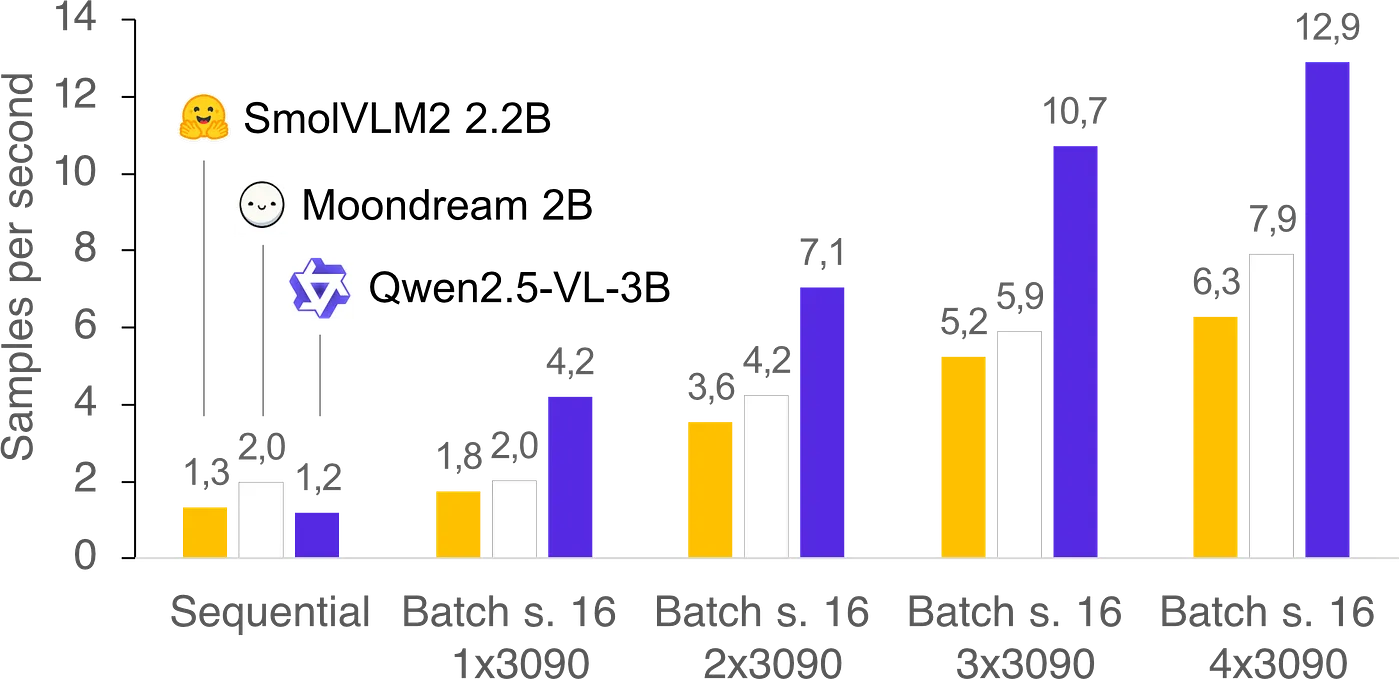
I also tested two other VLMs: Moondream2 and Qwen2.5-VL. Below are the performance numbers for all three VLMs.
One surprising finding was that Moondream doesn’t handle batching, meaning it can only process one image at a time. Despite this unexpected limitation, Moondream is quite fast and keeps up with SmolVLM while Qwen’s VLM outperforms the other two in terms of speed.
To not further bore you with walls of python code in this blog post, please find the functions for sequential and batch captioning for each VLM here.
Summary
Captioning large image datasets is a time-consuming task, but by leveraging batch processing and multiple GPUs, it can be significantly sped up. I hope this blog post got you started if you plan to caption billions and billions of images!
All the code snippets above and more can be found in my GitHub repo “3090 shorts”.