Finetuning Llama 2 and Mistral
A beginner’s guide to finetuning LLMs with QLoRA
This guide is for anyone who wants to customize powerful language models like Llama 2 and Mistral for their own projects. Using QLoRA, we’ll walk through the steps to finetune these large language models (LLMs) even if you don’t have a supercomputer at your disposal.
Key Point: You need good data for a good model. We’ll cover training on existing data and how to create your own dataset. You’ll learn how to format your data for training, specifically for the ChatML format. The code is kept simple, avoiding additional blackboxes or training tools, using basic PyTorch and Hugging Face packages only.
If you’re curious about the tech behind the scenes, here’s some suggested reading:
- An easy-to-follow guide to LLMs
- The QLoRA paper for the nuts and bolts, and a straightforward intro to LoRA
What you’ll learn here:
- How to find and prep datasets
- Turning datasets into ChatML format for training
- Load a quantized version of your base model and plug in the LoRA adapters
- Choosing the right training settings
If you are looking for complete code rather than walking through snippets, see my GitHub repo qlora-minimal. Let’s get started!
Prerequisites
Before we start, you’ll need the latest tools from Hugging Face. Run the following command in your terminal to install or update these packages:
pip install -U accelerate bitsandbytes datasets peft transformers tokenizersFor reference, these are the specific versions that were used to put together this tutorial:
accelerate                0.24.1
bitsandbytes              0.41.1
datasets                  2.14.6
peft                      0.6.0
transformers              4.35.0
tokenizers                0.14.1
torch                     2.1.0
1. Datasets: Existing or Create Your Own
This section is dedicated to the crucial process of loading or crafting a dataset, and subsequently formatting it according to the ChatML structure. Following this, we delve into the realms of tokenization and batching in the upcoming section.
Bear in mind that the quality of your dataset is essential — it will significantly impact your model’s performance. It’s essential that your dataset is well-tailored to your task.
General strategy
Datasets can be mixed from various sources. Take, for example, the Open Hermes 2 fine-tune of Mistral, which was trained on ~900,000 samples from a multitude of datasets.
These datasets often comprise Question-Answer pairs, formatted either as isolated pairs (a single sample equates to a single question and answer) or concatenated in a dialogic sequence (formatted as Q/A, Q/A, Q/A).
This section aims to guide you through converting these datasets into a uniform format compatible with training regimens. To prepare for training, one must select a format. I chose OpenAI’s ChatML here because it’s adopted frequently in recent model releases and might become the new standard.
Below is an example of a ChatML-formatted dialogue (from the Open Orca dataset):
<|im_start|>system
You are an AI assistant. User will you give you a task. Your goal is to
complete the task as faithfully as you can. While performing the task
think step-by-step and justify your steps.<|im_end|>
<|im_start|>user
Premise: A man is inline skating in front of a wooden bench. Hypothesis:
A man is having fun skating in front of a bench. .Choose the correct
answer: Given the premise, can we conclude the hypothesis?
Select from: a). yes b). it is not possible to tell c). no<|im_end|>
<|im_start|>assistant
b). it is not possible to tell Justification: Although the man is inline
skating in front of the wooden bench, we cannot conclude whether he is
having fun or not, as his emotions are not explicitly mentioned.<|im_end|>
The above example can be tokenized, batched, and input into the training algorithm. However, before we proceed, let’s examine a few well-known datasets and how to prepare and format them.
How to load Open Assistant data
Let’s start with the Open Assistant dataset.
from datasets import load_dataset
dataset = load_dataset("OpenAssistant/oasst_top1_2023-08-25")
Post-loading, the dataset is pre-divided into training (13k entries) and testing splits (700 entries).
>>> dataset
DatasetDict({
    train: Dataset({
        features: ['text'],
        num_rows: 12947
    })
    test: Dataset({
        features: ['text'],
        num_rows: 690
    })
})
Let’s look at the first entry:
>>> print(dataset["train"][0]["text"])
<|im_start|>user
Consigliami 5 nomi per il mio cucciolo di dobberman<|im_end|>
<|im_start|>assistant
Ecco 5 nomi per il tuo cucciolo di dobermann:
- Zeus
- Apollo
- Thor
- Athena
- Odin<|im_end|>
How convenient! This is ChatML already so we don’t need to do anything. Except telling the tokenizer and model that the strings <|im_start|> and <|im_end|> are tokens, should not be split, and <|im_end|> is a special token (eos, “end-of-sequence”) marking the end of an answer by the model, otherwise the model will generate forever and never stop. How to integrate these tokens with base models such as llama2 and mistral will be elaborated in Section 3.
How to load Open Orca data
Moving on to Open Orca, this dataset encompasses 4.2 million entries and requires a train/test split post-loading, which can be achieved using train_test_split.
from datasets import load_dataset

dataset = load_dataset("Open-Orca/OpenOrca")
dataset = dataset["train"].train_test_split(test_size=0.1)
Let’s inspect the structure of the dataset. Here’s the first entry:
{
    'id': 'flan.2020759',
    'system_prompt': 'You are an AI assistant. You will be given a task.
        You must generate a detailed and long answer.',
    'question': 'Ülke, bildirgeyi uygulamaya başlayan son ülkeler
        arasında olmasına rağmen 46 ülke arasında 24. sırayı
        aldı.
        Could you please translate this to English?',
    'response': 'Despite being one of the last countries to
        implement the declaration, it ranked 24th out of 46 countries.'
}
It’s a pair of question+answer and a system message describing the context in which the question has to be answered.
Contrary to the Open Assistant dataset we have to format the Open Orca data as ChatML ourselves.
def format_conversation(row):
    template="<|im_start|>system\n{sys}<|im_end|>\n<|im_start|>user\n{q}<|im_end|>\n<|im_start|>assistant\n{a}<|im_end|>"

    conversation=template.format(
        sys=row["system_prompt"],
        q=row["question"],
        a=row["response"],
    )

    return {"text": conversation}

import os
dataset = dataset.map(
    format_conversation,
    remove_columns=dataset["train"].column_names # remove all columns; only "text" will be left
    num_proc=os.cpu_count()  # multithreaded
)
Now, the dataset is ready to be tokenized and fed into the training pipeline.
Create dataset based on a podcast transcript
I previously trained llama1 on transcripts of the Lex Fridman podcast. This task involved turning a podcast known for its in-depth discussions into a training set that lets an AI imitate Lex’s way of talking. You can find the details on how the dataset was created in From Transcripts to AI Chat: An Experiment with the Lex Fridman Podcast.
from datasets import load_dataset
dataset = load_dataset("g-ronimo/lfpodcast")
dataset = dataset["train"].train_test_split(test_size=0.1)
Inspecting the first entry from the training set, you will see a JSON object like this:
>>> print(json.dumps(dataset["train"][0],indent=2))
{
  "title": "Lex_Fridman_Podcast_-_114__Russ_Tedrake_Underactuated_Robotics_Control_Dynamics_and_Touch",
  "episode": 114,
  "speaker_ratio_lex-vs-guest": 0.44402311303719755,
  "conversation": [
    {
      "from": "Guest",
      "text": "I think the most beautiful motion of a robot has to be the
          passive dynamic walkers. I think there's just something fundamentally
          beautiful. (..)  but what Steve and Andy did was they took it to
          this beautiful conclusion. where they built something that had knees,
          arms, a torso, the arms swung naturally, give it a little push,
          and that looked like a stroll through the park."
    },
    {
      "from": "Lex",
      "text": "How do you design something like that? Is that art or science?"
    },
(...)
This structure captures the essence of each podcast episode, but to prepare it for model training, the conversation needs to be transformed into the ChatML format. We will need to go through each message turn, apply the ChatML formatting, and concatenate the messages to store the entire episode transcript in a single text field. The roles of Guest and Lex will be reassigned to user and assistant, respectively, to condition the language model to adopt Lex’s inquisitive and knowledgeable persona.
def format_conversation(row):
    # Template for conversation turns in ChatML format
    template="<|im_start|>user\n{q}<|im_end|>\n<|im_start|>assistant\n{a}<|im_end|>"

    turns=row["conversation"]

    # If Lex is the first speaker, skip his turn to start with Guest's question
    if turns[0]["from"]=="Lex":
        turns=turns[1:]

    conversation=[]
    for i in range(0, len(turns), 2):
        # Assuming the conversation always alternates between Guest and Lex
        question=turns[i]  # Guest
        answer=turns[i+1]  # Lex

        conversation.append(
            template.format(
                q=question["text"],
                a=answer["text"],
                ))
    return {"text": "\n".join(conversation)}

import os
dataset = dataset.map(
    format_conversation,
    remove_columns=dataset["train"].column_names,
    num_proc=os.cpu_count()
)
By applying these changes, the resulting dataset will be primed for tokenization and feeding into the training pipeline, thus teaching the language model to converse in a manner reminiscent of Lex Fridman’s podcast discussions. Try llama-fridman if you are curious.
Create dataset based on a book
To dive deeper into the nuances of dataset creation, let’s consider a case where we want to train an AI to mirror the voice and personality of a renowned figure. I chose to turn the autobiography of the famous American chef Anthony Bourdain into a dataset. He wrote “Kitchen Confidential” where he vividly describes all the craziness in the kitchen and mind of a chef.
This process involves transforming the narrative of Bourdain’s book into an engaging dialogue, much like a back-and-forth interview that captures his spirit.
Steps required:
- Converting the book to text
- Paragraph analysis and segmentation: Once the book is in text form, we segment it into paragraphs. Short paragraphs are merged, and longer ones are split to ensure that each segment can stand on its own while still contributing to the overall storyline.
- Generating interview questions: For each paragraph, we construct an artificial interview scenario where an LLM plays the role of an interviewer, generating questions that elicit responses naturally fitting the given paragraph from the book. The goal is to stimulate an insightful dialogue, giving the impression that Bourdain himself is answering questions about his life and experiences.
Let’s start by assuming you legally obtained a digital copy of the book, kc.pdf
mv anthony-bourdain-kitchen-confidential.pdf kc.pdf
pdftotext  -nopgbrk kc.pdf

# fix line breaks within sentence
sed -r ':a /[a-zA-Z,\ ]$/N;s/(.)\n/\1 /;ta' kc.txt > kc_reformat.txt
Now use each paragraph n and paragraph n-1 to engage any smart open-source LLM or GPT-3.5/4. I used Open Hermes 2 to create an interview question for each paragraph.
# Gather paragraphs to target
with open("kc_reformat.txt") as f:
    file_content = f.read()

chapters=file_content.split("\n\n")

# Define minimum and maximum lengths to ensure a good interview flow
passage_minlen=300  # if paragraph <300 chars -> merge with next
passage_maxlen=2000  # if paragraph >2k chars -> split

# Process the chapters into suitable interview passages
passages=[]
for chap in chapters:
    passage=""
    for par in chap.split("\n"):
        if(len(passage)<passage_minlen) or not passage[-1]=="." and len(passage)<passage_maxlen:
            passage+="\n" + par
        else:
            passages.append(passage.strip().replace("\n", " "))
            passage=par

# Ask Open Hermes
prompt_template="""<|im_start|>system
You are an expert interviewer who interviews an autobiography of a famous chef.
You formulate questions based on quotes from the autobiography. Below is one
such quote. Formulate a question that the quote would be the perfect answer to.
The question should be short and directed at the author of the autobiography
like in an interview. The question is short. Remember, make the question as
short as possible. Do not give away the answer in your question.
Also: If possible, ask for motvations, feelings, and perceptions rather than
events or facts.

Here is some context that might help you formulate the question regarding the quote:
{ctx}
<|im_end|>
<|im_start|>user
Quote:
{par}<|im_end|>
<|im_start|>assistant
Question:"""

prompts=[]
for i,p in enumerate(passages):
    prompt=prompt_template.format(par=passages[i], ctx=passages[i-1])
    prompts.append(prompt)

# Prompt smart LLM, parse results, store Q/A in .json
...
You can find the complete code that worked for me here.
This is how the resulting .json file could look like:
{
  "question": "Why you choose to share your experiences and insights from
    your career in the restaurant industry despite the angry or wanting
    to horrify the dining public?",
  "answer": "I'm not spilling my guts about everything I've seen, learned
    and done in my long and checkered career as dishwasher, prep drone,
    fry cook, grillardin, saucier, sous-chef and chef because I'm angry
    at the business, or because I want to horrify the dining public. I'd
    still like to be a chef, too, when this thing comes out, as this life
    is the only life I really know. If I need a favor at four o'clock in
    the morning, whether it's a quick loan, a shoulder to cry on, a sleeping
    pill, bail money, or just someone to pick me up in a car in a bad
    neighborhood in the driving rain, I'm definitely not calling up a fellow
    writer. I'm calling my sous-chef, or a former sous-chef, or my saucier,
    someone I work with or have worked with over the last twenty-plus years."
},
{
  "question": "Why do you feel more comfortable sharing the \"dark recesses\"
    of the restaurant underbelly instead of writing about your personal
    experiences outside of the culinary world?",
  "answer": "No, I want to tell you about the dark recesses of the restaurant
    underbelly-a subculture whose centuries-old militaristic hierarchy and
    ethos of 'rum, buggery and the lash' make for a mix of unwavering order
    and nerve-shattering chaos-because I find it all quite comfortable, like
    a nice warm bath. I can move around easily in this life. I speak the
    language. In the small, incestuous community of chefs and cooks in New
    York City, I know the people, and in my kitchen, I know how to behave
    (as opposed to in real life, where I'm on shakier ground). I want the
     professionals who read this to enjoy it for what it is: a straight look
    at a life many of us have lived and breathed for most of our days and
    nights to the exclusion of 'normal' social interaction. Never having had
    a Friday or Saturday night off, always working holidays, being busiest
    when the rest of the world is just getting out of work, makes for a
    sometimes peculiar world-view, which I hope my fellow chefs and cooks
    will recognize. The restaurant lifers who read this may or may not like
    what I'm doing. But they'll know I'm not lying."
}
To finalize, we again convert the dataset into ChatML format:
interview_fn="kc_reformat_interview.json"
dataset = load_dataset('json', data_files=interview_fn, field='interview')
dataset=dataset["train"].train_test_split(test_size=0.1)

# chatML template, from https://huggingface.co/docs/transformers/main/chat_templating
tokenizer.chat_template = "{% if not add_generation_prompt is defined %}{% set add_generation_prompt = false %}{% endif %}{% for message in messages %}{{'<|im_start|>' + message['role'] + '\n' + message['content'] + '<|im_end|>' + '\n'}}{% endfor %}{% if add_generation_prompt %}{{ '<|im_start|>assistant\n' }}{% endif %}"

def format_interview(conv):
    messages = [
        {"role": "user", "content": conv["question"]},
        {"role": "assistant", "content": conv["answer"]}
    ]
    chat=tokenizer.apply_chat_template(messages, tokenize=False).strip()
    return {"text": chat}

dataset = dataset.map(
    format_conversation,
    remove_columns=dataset["train"].column_names
)
By transforming Bourdain’s autobiography, we aim to generate an AI that echoes his narrative style and perspective on the culinary industry, and embodies his life philosophy. The provided methodology is very basic and would benefit from further refinement such as removing low-content answers, stripping non-essential text elements like footnotes, page numbers etc. This would improve the quality of the model.
Talk to Mistral Bourdain if you are curious. Although the current output is a rudimentary mimic of Bourdain’s voice, it serves as a proof of concept; enhanced dataset curation would undoubtedly yield a more convincing simulation.
Create your own dataset
I think you get the idea by now. Here are a few additional ideas for creative dataset creation that GPT-4 came up with:
- Historical Figure Speeches Dataset. Collect speeches, letters, and written works of historical figures to create a dataset that reflects their speaking and writing styles. This could be used to generate educational content, such as simulated interviews with historical figures, or to create narrative experiences where these figures provide commentary on modern-day events.
- Fictional Worlds Encyclopedia. Create a dataset from various fantasy and science fiction novels that detail the world-building elements within these stories, such as geography, political systems, species, and technology. This could be used to train an AI to generate new fantasy worlds or to provide rich, contextual information for game development.
- Emotional Dialogue Dataset. Analyze movie scripts, plays, and novels to create a dataset of dialogues tagged with corresponding emotional tones. This dataset could be utilized to train an AI system that recognizes and generates dialogue with nuanced emotional undertones, beneficial for improving chatbots and virtual assistants’ empathic responses.
- Tech Product Reviews and Specifications Dataset. Compile a comprehensive dataset of technology product reviews, specifications, and user comments from various sources. This dataset could power a recommendation engine or an AI system designed to provide purchasing advice for consumers.
2. Load and prepare model and tokenizer
Before we start processing the data we just prepared, we need to load the model and tokenizer and make sure they process the ChatML tags <|im_start|> and <|im_end|> properly and are aware of <|im_end|> as the (new) eos token.
import torch
from transformers import AutoModelForCausalLM, AutoTokenizer, TrainingArguments, Trainer, BitsAndBytesConfig
from peft import prepare_model_for_kbit_training, LoraConfig, get_peft_model

modelpath="models/Mistral-7B-v0.1"

# Load 4-bit quantized model
model = AutoModelForCausalLM.from_pretrained(
    modelpath,
    device_map="auto",
    quantization_config=BitsAndBytesConfig(
        load_in_4bit=True,
        bnb_4bit_compute_dtype=torch.bfloat16,
        bnb_4bit_quant_type="nf4",
    ),
    torch_dtype=torch.bfloat16,
)

# Load (slow) Tokenizer, fast tokenizer sometimes ignores added tokens
tokenizer = AutoTokenizer.from_pretrained(modelpath, use_fast=False)

# Add tokens <|im_start|> and <|im_end|>, latter is special eos token
tokenizer.pad_token = "</s>"
tokenizer.add_tokens(["<|im_start|>"])
tokenizer.add_special_tokens(dict(eos_token="<|im_end|>"))
model.resize_token_embeddings(len(tokenizer))
model.config.eos_token_id = tokenizer.eos_token_id
Since we are not training all the parameters but only a subset, we have to add the LoRA adapters to the model using huggingface peft. Make sure to use peft >= 0.6, otherwise 1) get_peft_model will be very slow and 2) training will fail with Mistral.
# Add LoRA adapters to model
model = prepare_model_for_kbit_training(model)
config = LoraConfig(
    r=64,
    lora_alpha=16,
    target_modules = ['q_proj', 'k_proj', 'down_proj', 'v_proj', 'gate_proj', 'o_proj', 'up_proj'],
    lora_dropout=0.1,
    bias="none",
    modules_to_save = ["lm_head", "embed_tokens"],        # needed because we added new tokens to tokenizer/model
    task_type="CAUSAL_LM"
)
model = get_peft_model(model, config)
model.config.use_cache = False- LoRA rank
r: Determines the size of the low-rank matrices. The higher the rank the more parameters you train and the bigger your adapter files will be. Usually a number between 8 and 128. The maximum possible value, ie. training all parameters, would be 4096 for llama2-7b and Mistral (=hidden_sizeinconfig.json) and defeat the purpose of adding adapters. The QLoRA paper suggests64for Guanaco (Open Assistant dataset) which works well for me. target_modules: Another suggestion/finding of the QLoRA authors in their paper:
we find that the most critical LoRA hyperparameter is how many LoRA adapters are used in total and that LoRA on all linear transformer block layers are required to match full finetuning performance
modules_to_save: Specifies the modules apart from the LoRA layers to be set as trainable and saved in the final checkpoint. Since we added the ChatML tags as tokens to the vocabulary, we need to train and save the linear layerlm_headand the embedding matrixembed_tokenstoo. This will be relevant for merging the adapter back into the base model later.
3. Prepare data for Training
Proper tokenization and batching are essential to ensure that the data can be processed correctly.
Tokenization
Tokenize the text field in our dataset without adding special tokens or padding since we will do this manually.
def tokenize(element):
    return tokenizer(
        element["text"],
        truncation=True,
        max_length=2048,
        add_special_tokens=False,
    )

dataset_tokenized = dataset.map(
    tokenize,
    batched=True,
    num_proc=os.cpu_count(),    # multithreaded
    remove_columns=["text"]     # don't need the strings anymore, we have tokens from here on
)max_length: specifies the max length of a sample (in number of tokens). Everything longer than 2048 tokens will be truncated and not trained on. If your dataset has only short question/answer pairs in a single sample (e.g. Open Orca) then this will be more than enough, if your samples are longer (e.g. a podcast transcript), you will ideally either increase max_length (consumes VRAM) or split your samples into several smaller ones. The maximum value for llama2 is 4096. Mistral was “trained with 8k context length and fixed cache size, with a theoretical attention span of 128k tokens” but I never went beyond 4096.
Batching
The Hugging Face trainer expects a collator function to transform a list of samples to a dictionary holding a batch of padded
input_ids(tokenized text)labels(target text, same asinput_ids)- and
attention_masks(tensor of zeros and ones).
We will adopt a simplified version of the DataCollatorForCausalLM from the QLoRA repository for this purpose.
# collate function - to transform list of dictionaries [ {input_ids: [123, ..]}, {.. ] to single batch dictionary { input_ids: [..], labels: [..], attention_mask: [..] }
def collate(elements):
    tokenlist=[e["input_ids"] for e in elements]
    tokens_maxlen=max([len(t) for t in tokenlist])  # length of longest input

    input_ids,labels,attention_masks = [],[],[]
    for tokens in tokenlist:
        # how many pad tokens to add for this sample
        pad_len=tokens_maxlen-len(tokens)

        # pad input_ids with pad_token, labels with ignore_index (-100) and set attention_mask 1 where content, otherwise 0
        input_ids.append( tokens + [tokenizer.pad_token_id]*pad_len )
        labels.append( tokens + [-100]*pad_len )
        attention_masks.append( [1]*len(tokens) + [0]*pad_len )

    batch={
        "input_ids": torch.tensor(input_ids),
        "labels": torch.tensor(labels),
        "attention_mask": torch.tensor(attention_masks)
    }
    return batch
4. Training Hyperparameters
The choice of hyperparameters can significantly impact model performance. Here are the hyperparameters we’ve selected for our training:
bs=8        # batch size
ga_steps=1  # gradient acc. steps
epochs=5
steps_per_epoch=len(dataset_tokenized["train"])//(bs*ga_steps)

args = TrainingArguments(
    output_dir="out",
    per_device_train_batch_size=bs,
    per_device_eval_batch_size=bs,
    evaluation_strategy="steps",
    logging_steps=1,
    eval_steps=steps_per_epoch,  # eval and save once per epoch
    save_steps=steps_per_epoch,
    gradient_accumulation_steps=ga_steps,
    num_train_epochs=epochs,
    lr_scheduler_type="constant",
    optim="paged_adamw_32bit",
    learning_rate=0.0002,
    group_by_length=True,
    fp16=True,
    ddp_find_unused_parameters=False,    # needed for training with accelerate
)
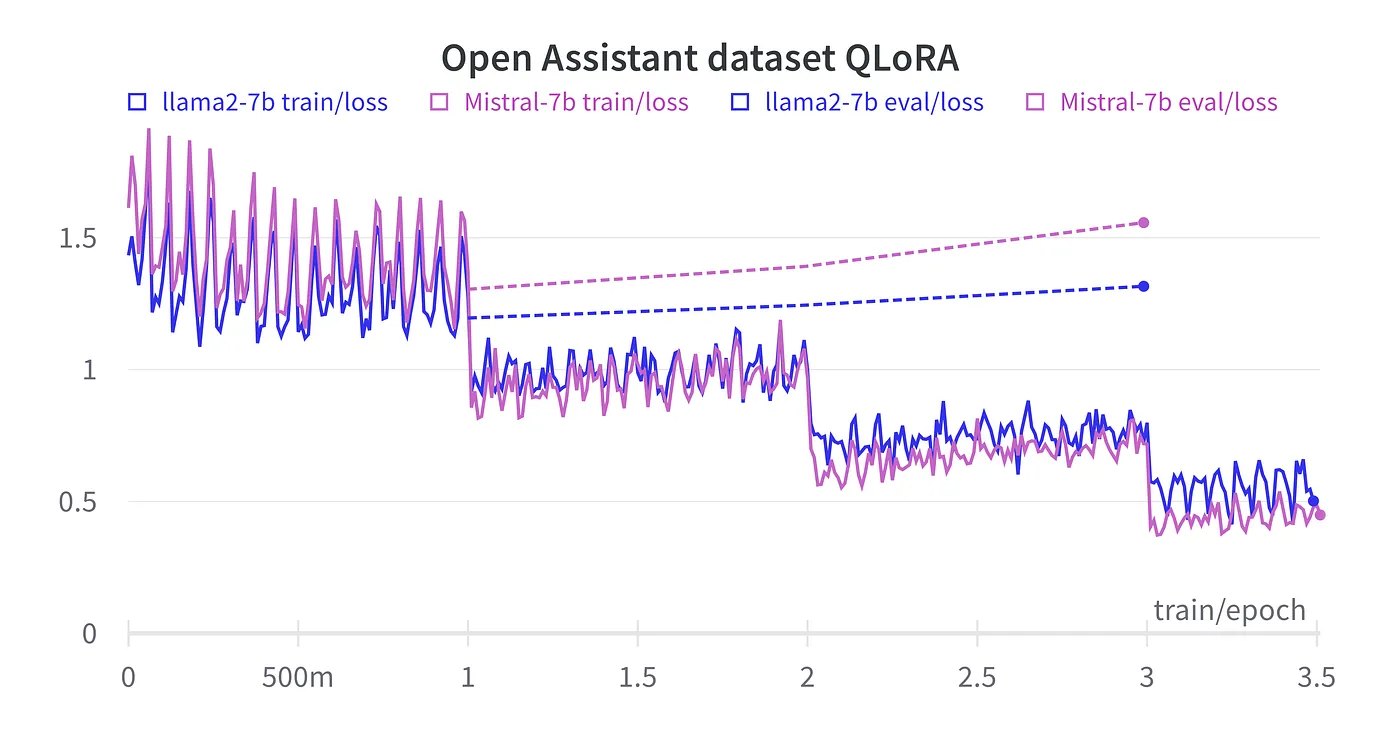
batch size: As high as possible to increase speed. Consumes VRAM, reduce if OOM.gradient_accumulation_steps: Increases effective batch size without consuming additional VRAM but makes training slower. The effective batch size isbatch_size*gradient_accumulation_steps.steps_per_epoch: If your dataset has 80 samples and your effective batch size is 8 (e.g.batch_size8 andgradient_accumulation_steps1) you will process your entire dataset in 10 steps (=1 epoch).num_train_epochs: How many epochs to train depends on your dataset. Ideally the loss on your eval split will tell you when to stop training and which checkpoint is the best - but training Guanaco for example results in increasing eval_loss after epoch 2 already, indicating overfitting to the training set, even though the model improves in quality. More on this and an official reply by the QLoRA authors on github and in one of my previous stories. To sum up: you will simply have to see which checkpoint performs best for your specific task. Usually, 3-4 epochs is a good start.learning_rate: We will use the default learning rate suggested by the QLoRA authors, 0.0002 for a 7B (or 13 B) model. For models with more parameters, lower learning rates are suggested: 0.0001 for models with 33B and 65B parameters.
Let’s train.
trainer = Trainer(
    model=model,
    tokenizer=tokenizer,
    data_collator=collate,
    train_dataset=dataset_tokenized["train"],
    eval_dataset=dataset_tokenized["test"],
    args=args,
)

trainer.train()
Example Training Run
Train and Eval Loss
Here’s a wandb chart of a typical training run for the Open Assistant (OA) dataset, comparing finetuning llama2–7b and Mistral-7b.
Training time and VRAM usage
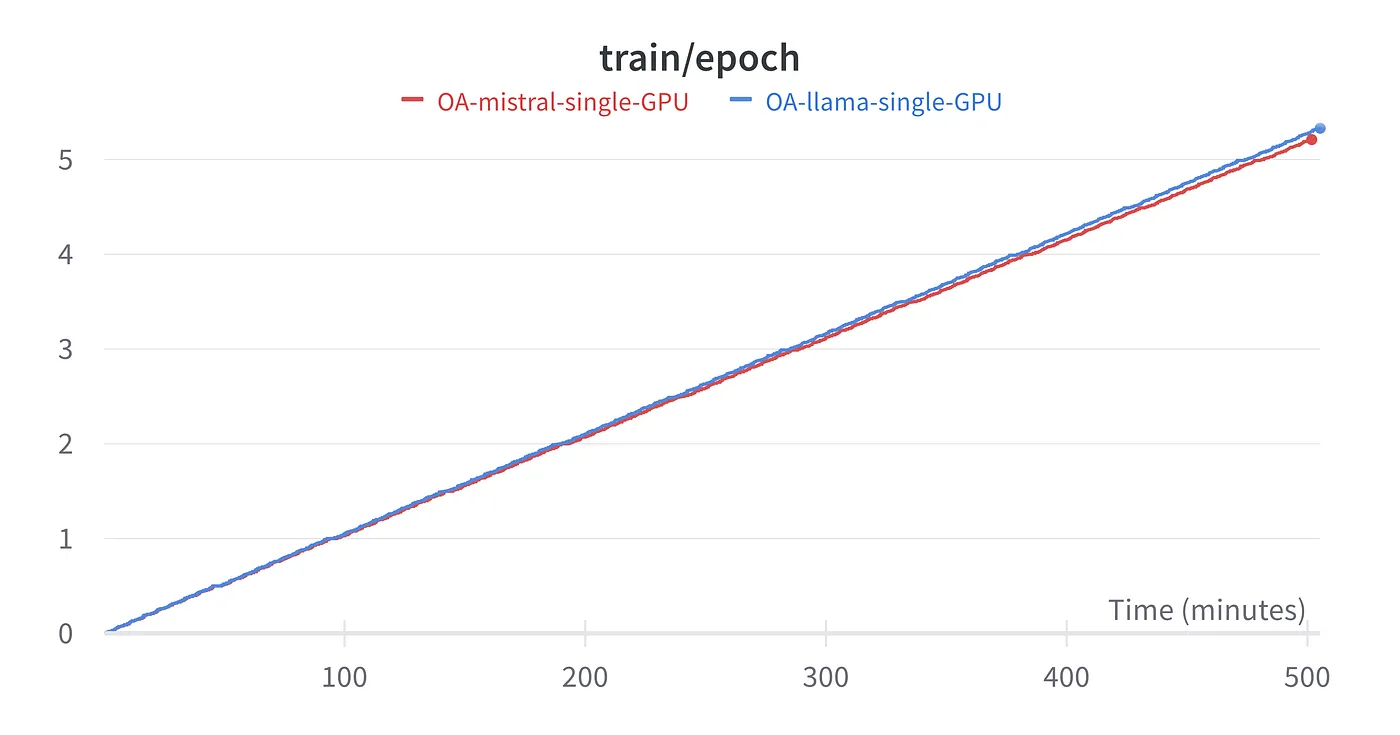
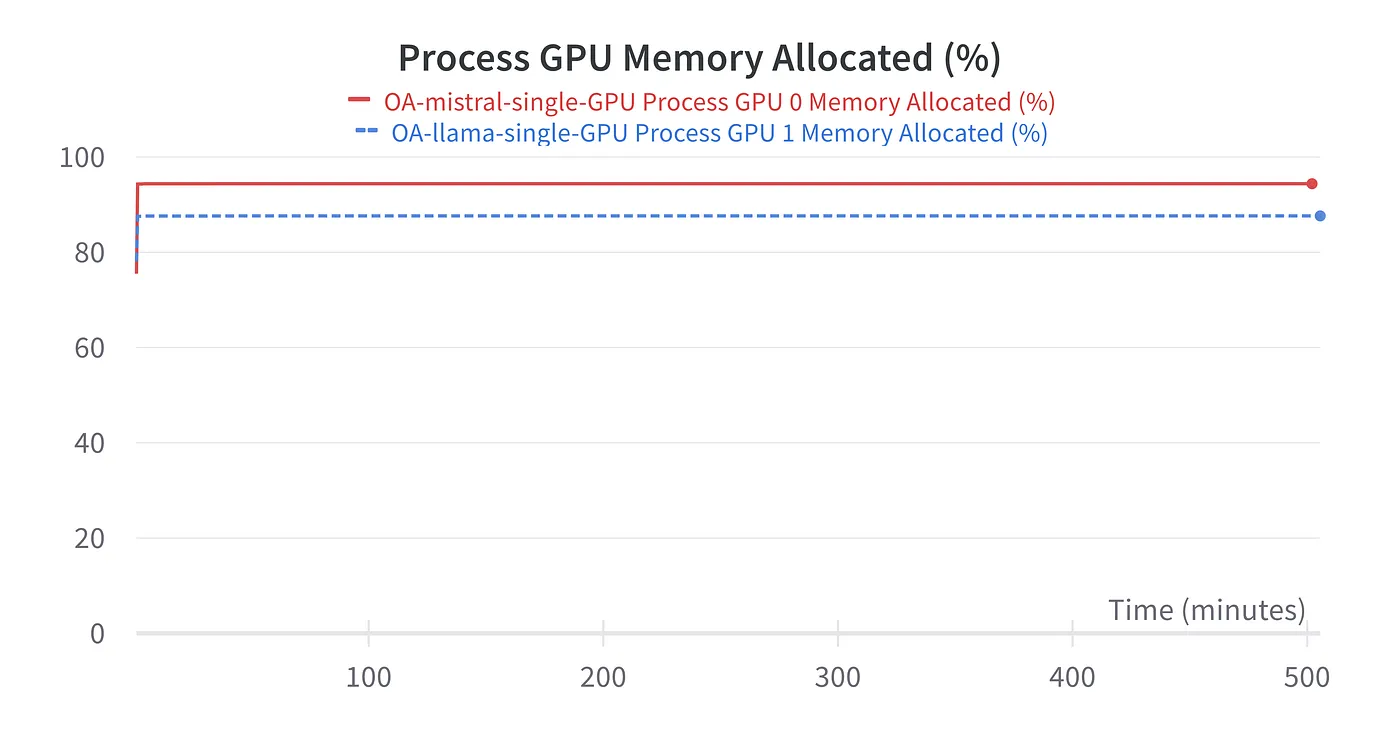
Finetuning Llama2–7B and Mistral-7B on the Open Assistant dataset on a single GPU with 24GB VRAM takes around 100 minutes per epoch.
- GPU: NVIDIA GeForce RTX 3090
- dataset “OpenAssistant/oasst_top1_2023–08–25”
- batch size 16, grad. acc. steps 1
- sample
max_length512
Merge LoRA adapters with base model
The following code is a bit different than other scripts (such as the one provided by TheBloke for example) because we added tokens for ChatML before training. We did not change the base model though, this is why before loading the adapters we have to add the new tokens to the base model and tokenizer; otherwise we will try to merge adapters with two additional tokens to a model without these tokens (and this will fail).
from transformers import AutoModelForCausalLM, AutoTokenizer
from peft import PeftModel
import torch

base_path="models/Mistral-7B-v0.1"    # input: base model
adapter_path="out/checkpoint-606"     # input: adapters
save_to="models/Mistral-7B-finetuned"    # out: merged model ready for inference

base_model = AutoModelForCausalLM.from_pretrained(
    base_path,
    return_dict=True,
    torch_dtype=torch.bfloat16,
    device_map="auto",
)

tokenizer = AutoTokenizer.from_pretrained(base_path)

# Add/set tokens (same 5 lines of code we used before training)
tokenizer.pad_token = "</s>"
tokenizer.add_tokens(["<|im_start|>"])
tokenizer.add_special_tokens(dict(eos_token="<|im_end|>"))
base_model.resize_token_embeddings(len(tokenizer))
base_model.config.eos_token_id = tokenizer.eos_token_id

# Load LoRA adapter and merge
model = PeftModel.from_pretrained(base_model, adapter_path)
model = model.merge_and_unload()

model.save_pretrained(save_to, safe_serialization=True, max_shard_size='4GB')
tokenizer.save_pretrained(save_to)
Troubleshooting
Challenges are part and parcel of model training. Let’s discuss some common issues and their resolutions.
OOM
If you encounter an Out of Memory (OOM) error:
- Consider reducing the batch size.
- Shorten training samples by cutting down on context length (
max_lengthintokenize()).
Training too Slow
If training seems sluggish:
- Increase batch size.
- Multiple GPUs, buy or rent (on runpod for example). The code provided here is ready for accelerate and can be used to train in multi-GPU settings, simply launch with
accelerate launch qlora.pyinstead ofpython qlora.py.
Bad Quality of the Final Model
The quality of your model is a reflection of your dataset’s quality. To improve model quality:
- Ensure your dataset is rich and relevant.
- Tune hyperparameters:
learning_rate,epochs, rankr,lora_alpha
Wrap-Up
- Understand what you are doing. There are excellent training tools like axolotl which allow you to focus on dataset creation rather than writing your own padding function. Still, a solid grasp of the underlying mechanisms is invaluable. This knowledge empowers you to navigate complexities and troubleshoot with confidence.
- Incremental Approach: Begin with a basic example using a small dataset. Gradually scale up and adjust parameters incrementally to uncover their impact on model performance.
- Emphasize Data Quality: High-quality data is the cornerstone of effective training. Be innovative and diligent in assembling your dataset.
Finetuning LLMs like Llama 2 and Mistral is a rewarding process, especially when you have the right dataset and training parameters. Remember always to keep an eye on the model’s performance and be ready to iterate and adapt.
The code can be found in my GitHub repo qlora-minimal: a QLoRA training script, one for merging adapters to the base model, and a Jupyter notebook.