Client-Side NSFW Image Detection with DINOv3
Train a classifier with Meta’s new model and run it in the browser
Anyone running a website dealing with images gets loads of NSFW uploads from random anons. They will eat your compute budget and bandwidth if you don’t protect yourself.
NSFW detection APIs are one approach to protect your APIs, but could we also run a small vision model in the browser? I used the release of Meta’s DINO version 3 as an opportunity to explore this.
Is this the best NSFW detector you will ever meet? No. It’s a starting point for customizing this powerful model to your own needs and deploying it on the client side.
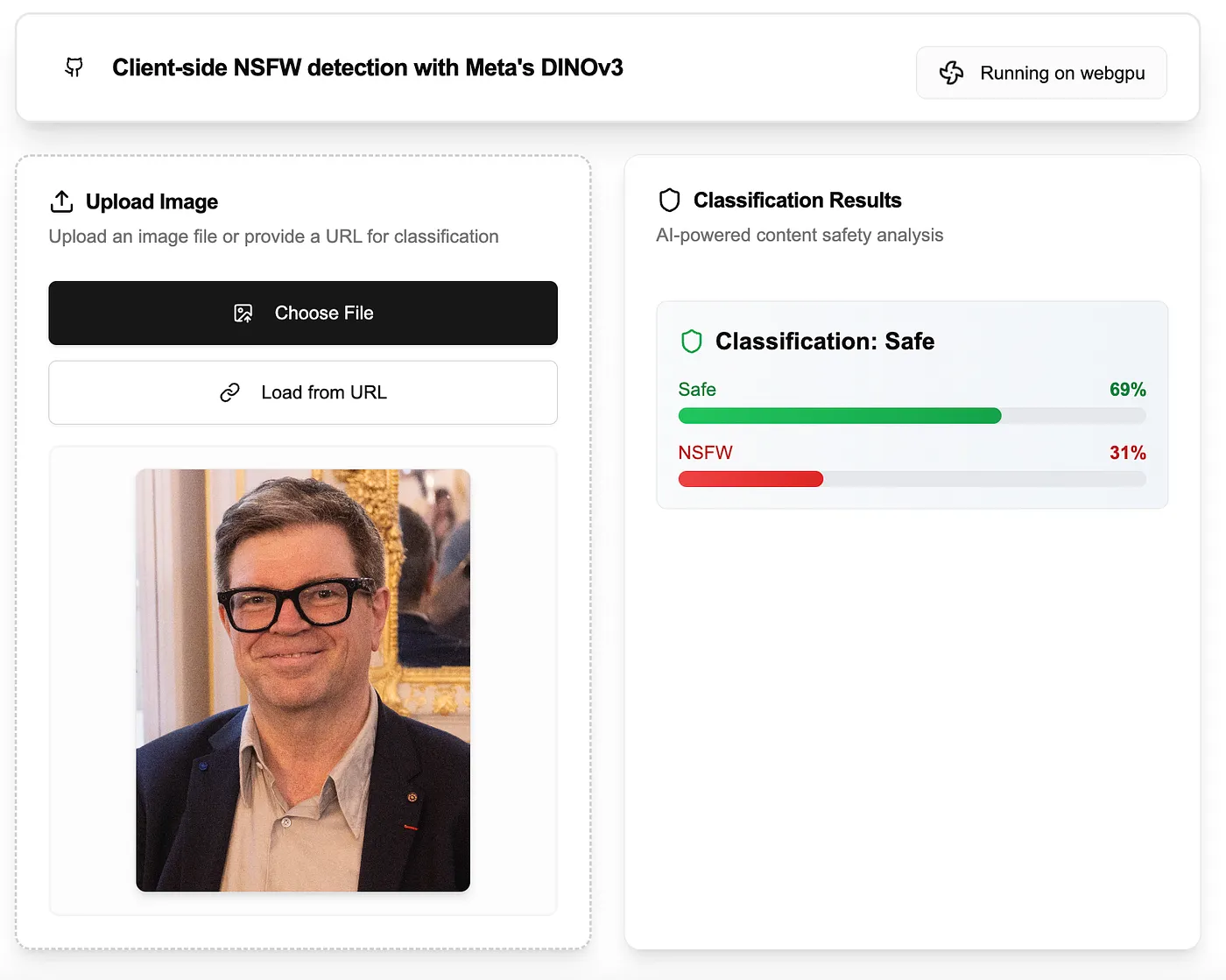
The internet is for porn and cats
I run a few image editing services, one for restoring old photos and a headshot generator. With increasing traffic, the amount of weird uploads exploded to such an extent that I had to stop checking the logs on my phone in public.
A screen filter would be one solution, another one is to protect your (expensive) image processing APIs. Falcons.ai for example trained a ViT to detect NSFW content, conveniently available as an API on replicate.
Or maybe you saw Meta’s DINOv3 announcement, noticed its smallest variant is just 86MB, and wondered:
- Can I train DINOv3 for NSFW detection and run it in the browser?
- Would that be a useful model or am I reinventing the wheel?
Let’s waste another weekend!
What is DINO ?
DINO is a self-supervised model for computer vision that learns powerful visual features without human-labeled data by analyzing small image patches (like puzzle pieces) and their relationships. It excels at both global tasks (like classifying entire images) and dense tasks (like segmenting objects or estimating depth) by training on massive datasets.
DINOv3 scales to 7 billion parameters, sets new performance benchmarks and was distilled into smaller models for real-world use.
Official DINOv3 showcase by meta. Source: https://ai.meta.com/dinov3/
DINO delivers global and local features of an image. In simple words, it transforms an image into embedding vectors which holds semantic information about that specific image patch.
To give you an idea of what the local features look like:
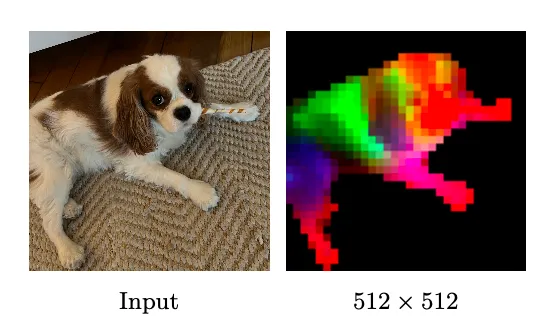
If this does not excite you, check out a demo made by 🤗 Xenova using dense DINOv3 features to segment videos. Check it out in any case.
The global features capture the semantic essence of an image overall (e.g., “a cat on a couch” or “a street scene at night”) in a single vector, known as the [CLS] token or classification token.
We will leverage this token by training a lightweight linear layer on top of it to classify images as NSFW or SFW.
Train DINO for NSFW Detection
We train with PyTorch and a few common packages. I will introduce the required code blocks step-by-step. Check out the complete training notebook if you want to get right into it.
These are the python packages I used:
datasets==4.0.0
torch==2.7.1
torchvision==0.22.1
transformers==4.56.1
We use the frozen backbone of the smallest DINOv3 variant dinov3-vits16, make sure to apply for access to this Hugging Face repo.
device = "cuda" if torch.cuda.is_available() else "mps" if torch.mps.is_available() else "cpu"

model_repo = "facebook/dinov3-vits16-pretrain-lvd1689m"
processor = AutoImageProcessor.from_pretrained(model_repo)
backbone = AutoModel.from_pretrained(model_repo)
Before we get into setting up the linear classifier, let’s find some training data.
Composing a NSFW/SFW Dataset
Crucial part of this endeavour. My first attempt failed, the result was a female face detector. I had to iterate quite a bit on this and came up with a mix of a dedicated NSFW dataset (yesidobyte/nsfw1024) and three SFW datasets:
- Neutral images (johnowhitaker/imagenette2–320)
- Human faces (nielsr/CelebA-faces)
- Photos of human crowds (yuvalkirstain/pexel_people)
def load_nsfwdataset(processor, batch_size_train, batch_size_test=None, seed=42, resizeTo=320):
    if batch_size_test is None:
        batch_size_test = batch_size_train // 2

    # Load NSFW
    ds_nsfw = load_dataset("yesidobyte/nsfw1024")["train"]

    # Resize and label NSFW
    ds_nsfw = ds_nsfw.map(
        lambda x: {
            "image": x["image"].resize((resizeTo, resizeTo)),
            "label": 1
        },
        batched = False,
        num_proc = os.cpu_count(),
        desc = "Resizing NSFW images"
    )

    # Load SFW = Imagenet + CelebA + pexel_people
    num_to_pick = len(ds_nsfw)
    ds_sfw_premix = [
        load_dataset("johnowhitaker/imagenette2-320")["train"].remove_columns("label"),
        load_dataset("nielsr/CelebA-faces")["train"],
        load_dataset("yuvalkirstain/pexel_people")["train"].remove_columns(['text', 'generated_caption']),
    ]
    ds_sfw = concatenate_datasets([
        d.shuffle().select(range(min(num_to_pick // len(ds_sfw_premix)  + 10, len(d))))
        for d in ds_sfw_premix
    ]).shuffle()

    # Resize and label SFW
    ds_sfw = ds_sfw.map(
        lambda x: {
            "image": x["image"].resize((resizeTo, resizeTo)),
            "label": 0
        },
        batched = False,
        num_proc = os.cpu_count(),
        desc = "Resizing SFW images"
    )

    # Cmobine SFW and NSFW
    mixed_dataset = concatenate_datasets([ds_nsfw, ds_sfw])
    print(f"SFW: {len(ds_sfw)} images, NSFW: {len(ds_nsfw)} images")

    # Shuffle and split into train and test
    ds = mixed_dataset.train_test_split(test_size=0.1, seed=seed)

    # Prepare dataloaders
    dataloader_train = torch.utils.data.DataLoader(
        ds["train"],
        batch_size = batch_size_train,
        shuffle = True,
        collate_fn = partial(collate_fn, processor=processor, augment_fn=augment),
        prefetch_factor = 2,
        num_workers = 4,
    )

    dataloader_test = torch.utils.data.DataLoader(
        ds["test"],
        batch_size = batch_size_test,
        collate_fn = partial(collate_fn, processor=processor, augment_fn=augment),
        prefetch_factor = 2,
        num_workers = 4,
    )

    return dataloader_train, dataloader_test
We balance the dataset by using all 4,289 images from the NSFW dataset and sampling an equal number (roughly) from the combined SFW sources (Imagenette, CelebA, and Pexels crowds). This gives us a final dataset of around 8.5k images, split evenly between NSFW and SFW classes.
The DINO preprocessor produces 224×224px images by default, but many images in our datasets are significantly larger. To avoid resizing on-the-fly during training (which would slow down data loading), we pre-resize all images using Hugging Face’s map function. This keeps the data collator collate_fn fast by offloading heavy operations to the dataset preparation stage.
Quick side note: the data collator function runs during training and turns a list of samples (picked by the dataloader) into a single batch. This function should be fast to keep the GPU busy.
Finally, we feed the resized images into our data loader and provide a custom collate function.
def collate_fn(rows, processor, augment_fn=None):
    labels = [r["label"] for r in rows]
    images = [r["image"].convert('RGB') for r in rows]

    images = [augment_fn(img) for img in images] if augment_fn else images
    tensors_list = [processor(images=img, return_tensors="pt")["pixel_values"] for img in images]
    tensor = torch.cat(tensors_list)

    return tensor, labels, images
We augment the images by randomly flipping, rotating, messing with the colors and then crop from the center to hide the black edges left after rotation.
def augment(image, cropBox=224):
    augmentation = T.Compose([
        T.RandomHorizontalFlip(p=0.5),
        T.RandomRotation(degrees=10),
        T.ColorJitter(brightness=0.2, contrast=0.2, saturation=0.2, hue=0.1),
        T.CenterCrop((cropBox, cropBox)),
    ])

    image = augmentation(image)

    return image
Model Setup
Let’s setup our classifier model by adding a linear layer on top of the frozen DINO backbone.
Credits to 🤗 mervenoyann for her DINOv3 notebook which got me started on training this model.
class DinoV3Linear(nn.Module):
    def __init__(self, backbone, hidden_size: int, num_classes: int, freeze_backbone: bool = True):
        super().__init__()
        self.backbone = backbone
        if freeze_backbone:
            for p in self.backbone.parameters():
                p.requires_grad = False
            self.backbone.eval()

        self.head = nn.Linear(hidden_size, num_classes)

    def forward(self, pixel_values):
        outputs = self.backbone(pixel_values=pixel_values)
        last_hidden = outputs.last_hidden_state
        # Class token
        cls = last_hidden[:, 0]
        logits = self.head(cls)
        return logits

    def count_params(self):
        total_params = sum(p.numel() for p in self.parameters())
        trainable_params = sum(p.numel() for p in self.parameters() if p.requires_grad)
        return total_params, trainable_params

    @property
    def device(self):
        return next(self.parameters()).device
We are ready to load our model for training.
hidden_size = getattr(backbone.config, "hidden_size", None)
model = DinoV3Linear(backbone, hidden_size, num_classes=2, freeze_backbone=True).to(device)

total_params, trainable_params = model.count_params()
Our DINO variant (dinov3-vits16-pretrain-lvd1689m) produces embedding vectors with 384 numbers (hidden_size), we add a linear layer to classify into two output classes (SFW, NSFW; num_classes). In the end, our DinoV3Linear model has 21.60M parameters out of which 770 are trainable, that’s our linear layer (384 weights + 1 bias per output neuron).
Beautiful! Let’s start training.
Training
The model is rather small and does not need big compute to run, I prototyped the training code on my M3 macbook. To iterate faster in the end I moved to RunPod. If you’re creating a new account, you can use my referral link to sign up, which I’d appreciate.
I used the standard torch optimizer Adam, a learning rate of 5e-5, and a batch size of 64.
optimizer = torch.optim.Adam(model.parameters(), lr=0.00005)
ds_train, ds_test = load_nsfwdataset(processor, batch_size_train = 64)
Empirically chosen parameters, not a lot fiddling around needed here. I usually go for an LR of 10-e4 for models in the B parameter range so I started with something lower for this tiny model. The batch size is kind of a tradeoff between data loading time and the number of total steps. With these parameters, 10 epochs lead to around 1k steps and to a decent 95% accuracy on the test set.
Before we get into the actual training loop, I usually inspect the first batch to make sure the preprocessing, data loader, and augmentations actually work.
tensors, labels, images = next(iter(ds_train))
grid = make_grid([T.ToTensor()(i) for i in images], nrow=8, padding=2, normalize=True)

T.ToPILImage()(grid).save("zerobatch.jpg")
Don’t open that image on your subway ride.
The training loop:
step = 0

for epoch in range(10):
    for images, labels, images_pil in ds_train:
        images, labels = images.to(device), torch.Tensor(labels).to(device).long()

        # Debug: Save first batch for inspection
        if step == 0:
            grid = make_grid([T.ToTensor()(i) for i in images_pil], nrow=8, padding=2, normalize=True)
            T.ToPILImage()(grid).save("zerobatch.jpg")

        logits = model(images)
        loss = nn.functional.cross_entropy(logits, labels)
        loss.backward()
        optimizer.step()
        optimizer.zero_grad()

        if step % 10 == 0:
            print(f"step {step} (epoch {epoch}), loss {loss.item():.2f}")

        if step % 100 == 0:
            model.eval()
            test_acc, test_loss = test_accuracy(ds_test, model)
            print(f"step {step} (epoch {epoch}), test accuracy {test_acc:.2f} loss {test_loss:.2f}")
            model.train()

        step += 1
Pretty simple. We print the training loss every 10 steps and evaluate loss and accuracy every 100 steps.
def test_accuracy(dataset, model):
    num_correct, num_total = 0, 0
    test_loss = 0.0

    for images, labels, images_pil in tqdm(dataset, "Test accuray"):
        images, labels = images.to(model.device), torch.Tensor(labels).to(model.device).long()

        with torch.no_grad():
            logits = model(images)
        loss = nn.functional.cross_entropy(logits, labels)
        predictions = torch.argmax(logits, dim=1).cpu()

        test_loss += loss.item() * len(labels)
        num_correct += (labels.cpu() == predictions).sum().item()
        num_total += len(labels)

    return num_correct / num_total * 100, test_loss / num_total
The output of the training loop should look like this:
step 0 (epoch 0), loss 0.63
Test accuray: 100%|██████████| 27/27 [00:04<00:00,  6.32it/s]
step 0 (epoch 0), test accuracy 62.02 loss 0.66
step 10 (epoch 0), loss 0.67
step 20 (epoch 0), loss 0.64
step 30 (epoch 0), loss 0.63
step 40 (epoch 0), loss 0.59
step 50 (epoch 0), loss 0.62
step 60 (epoch 0), loss 0.59
step 70 (epoch 0), loss 0.57
step 80 (epoch 0), loss 0.53
step 90 (epoch 0), loss 0.54
step 100 (epoch 0), loss 0.53
Loss on the training and test set decrease while the accuracy goes up to around 95% after 10 epochs.
step 1100 (epoch 9), test accuracy 95.59 loss 0.23
step 1110 (epoch 9), loss 0.17
step 1120 (epoch 9), loss 0.22
step 1130 (epoch 9), loss 0.23
step 1140 (epoch 9), loss 0.18
step 1150 (epoch 9), loss 0.16
step 1160 (epoch 9), loss 0.18
step 1170 (epoch 9), loss 0.22
step 1180 (epoch 9), loss 0.19
step 1190 (epoch 9), loss 0.21
step 1200 (epoch 9), loss 0.18
Test accuray: 100%|██████████| 27/27 [00:03<00:00,  8.92it/s]
step 1200 (epoch 9), test accuracy 95.70 loss 0.21
Done. We trained a classifier model which seems to perform well on the unseen test set.
Let’s test it with a random image.
# nsfw anime
url = "https://www.cumfaceai.com/anime-large.png"

image = load_image(url)

inputs = processor(images=image, return_tensors="pt").to(model.device)
with torch.inference_mode():
    outputs = model(**inputs)

probabilities = F.softmax(outputs, dim=1)

# Output: tensor([[0.3899, 0.6101]], device='cuda:0')
Works, n=1. Save it and move on.
torch.save(model.state_dict(), "dino_v3_linear.pth")Next, let’s make it run in the browser.
Deploy Trained Model in the Browser
To run our classifier in the browser with onnxruntime we will spend a bit more time with python and then switch to JavaScript.
Convert to ONNX
torch.onnx.export(model,
    inputs["pixel_values"],
    "dino_v3_linear.onnx",
    export_params=True,
    opset_version=17,
    do_constant_folding=True,
    input_names = ['pixel_values'],
    output_names = ['classification'],
)
This should produce a .onnx file with 87 MB.
Next, we wrap the model in a Next.JS app.
Model Loading
We are in JavaScript land on the client-side now. I focus on the crucial steps, please note that there’s a whole lot of additional overhead to provide a smooth user experience like using local storage and webworkers. Check out the full source code of this app on GitHub.
First, we load the model for inference using the node package onnxruntime-web.
static async getInstance() {
  if (!this.buffer) {
    await this.downloadModel()
  }

  if (!this.session) {
    // try webgpu first, then cpu
    for (let ep of ["webgpu", "cpu"]) {
      try {
        this.session = await ort.InferenceSession.create(this.buffer, {
          executionProviders: [ep],
        });
        this.sessionDevice = ep

        return {session: this.session, device: this.sessionDevice}

      }
      catch (e) {
        console.error(e);
        continue;
      }
    }
    console.error("Creating model session failed!")
    return null
  }
This loads the model on the user’s GPU if there is one and the browser supports WebGPU, otherwise CPU, which also runs reasonably fast.
downloadModel (code) downloads the .onnx file from my Hugging Face model repository g-ronimo/dinov3_nsfw_classifier and saves it locally for future use.
Image Preprocessing
Input images have to be preprocessed before feeding them into the onnxruntime model session. For this, we borrow DINOv3ViTImageProcessor from Xenova’s transformer.js:
import { AutoProcessor, RawImage } from "@huggingface/transformers";

const MODEL_ID = "onnx-community/dinov3-vits16-pretrain-lvd1689m-ONNX";
const processor = await AutoProcessor.from_pretrained(MODEL_ID)

export default class Dino {
  ...
  async process(canvas) {
    await this.modelReadyPromise

    // Canvas -> RawImage --Preprocess--> Tensor -> Float32Array -> send to worker (Tensor are not serializable, send as Float32Array)
    const image = await RawImage.fromCanvas(canvas);
    const vision_inputs = await processor(image);
    const tensor = vision_inputs.pixel_values.ort_tensor

    // final inputs to the model:
    const float32Array = tensor.cpuData
    const shape = tensor.dims

    const tensorData = { float32Array, shape }

    this.worker.postMessage({
      type: 'process',
      data: tensorData
    });

    return new Promise((resolve, reject) => {
      this.processingPromiseResolve = resolve;
    });
  }
  ...
}
The UI handles the input image as an HTML5 Canvas which we turn into a RawImage and feed into the processor, the resulting Tensor is then sent to the model worker. We send a Float32Array to the webworker because the actual transformers.js Tensor cannot be serialized.
Model Inference
On the webworker side we reconstruct the tensor, feed the model, and do a softmax to get the probabilities for SFW, NSFW.
import { Tensor, softmax } from "@huggingface/transformers";

...
  // reconstruct tensor
  const { float32Array, shape } = data;
  const imgTensor = new Tensor("float32", float32Array, shape);

  // run model
  const results = await session.run({ pixel_values: imgTensor });

  // get logits and softmax() -> probs
  const logits = results.classification.cpuData ? results.classification.cpuData : results.classification.data
  const probs = softmax(logits)
...
And that’s it for the app. The rest is UI setup and visualizing the results.
Check out the deployed Next.JS app at next-safedino.vercel.app.
Why This Matters
- Privacy & Cost: Client-side detection saves server costs and avoids sending sensitive images to third-party APIs.
- Customization: Swap datasets or the classification head to adapt the model for your specific use case.
- Performance: DINOv3’s efficiency makes it viable for real-time applications. The model is really fast, even without a GPU in my experience.
This is not the ultimate NSFW detector, it’s a launchpad. DINOv3’s flexibility means you can repurpose it for object detection, aesthetic scoring, whatever.