Build the Most Simple CSV RAG From Scratch
Step by step. 100 lines of Python without the bloat
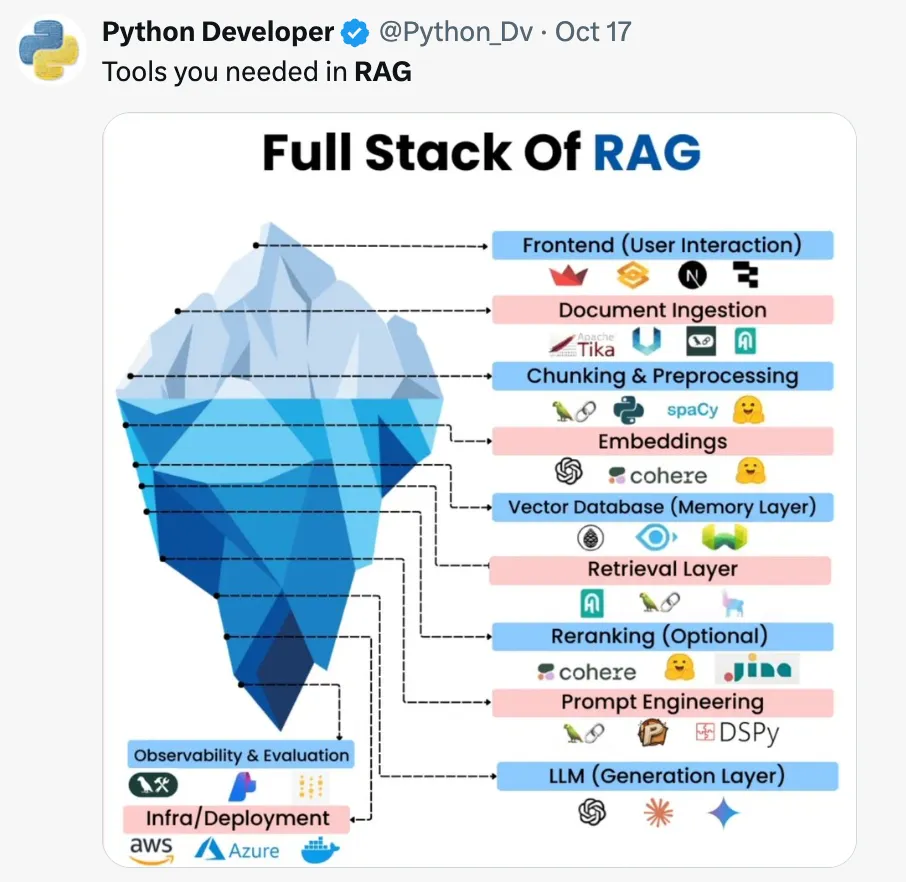
Use a 10 layer stack to get started with RAG?
But trust a system you don’t understand? How will you fix your SmartLLMChain if you have no idea what it is actually doing behind the scenes?
Start Simple!
This RAG for CSV implementation fits in 100 lines of Python (tinygrad-style). It uses a stroke risk dataset, SQLite, and the Mistral API (or Qwen3 for local experiments) to answer questions with SQL.
No frameworks. No magic.
RAG
LLMs predict the next token in a text. They’ve memorized Wikipedia, Reddit, and half the internet. But what about your data? That’s where RAG comes in: Retrieval-Augmented Generation.
If you want the LLM to use your data, you shove it into the context. Think of it as a dialog: a system prompt (“You are a helpful agent”) and a question (“What’s the capital of France?”).
RAG is a fancy term for: find relevant data, stuff it into the prompt, and let the LLM generate an answer. For example, retrieve a chapter from a book, dump it into the context, and ask for a summary.
Let’s skip the examples and retrieve something at least mildly interesting. A medical dataset!
Dataset
We use the Stroke Prediction Dataset from Kaggle. 5,000 patient records with gender, age, marital status, hypertension, BMI and whether they had a stroke or not.
A perfect dataset for a minimal RAG script. One CSV file, more complex than hello world, but rich enough to ask the important questions. Is marriage actually the secret cause of high blood pressure?
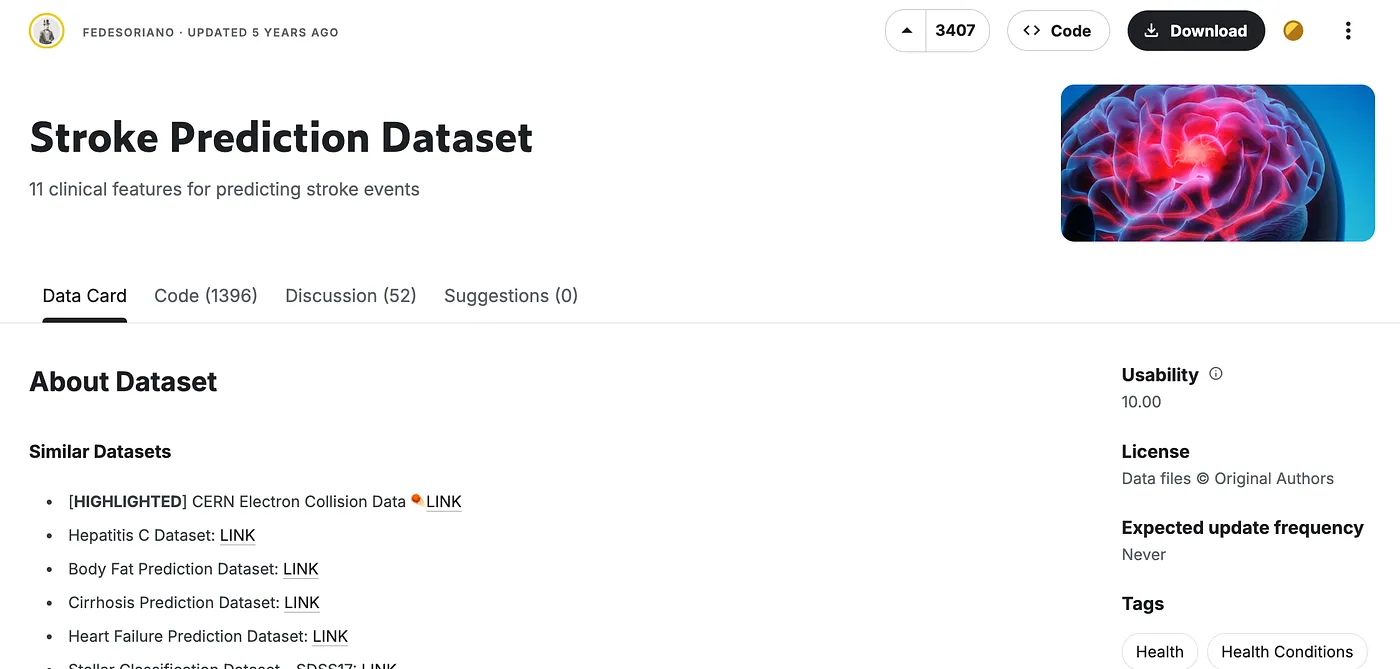
Go to Kaggle, download healthcare-dataset-stroke-data.csv and head into it.
import pandas

csv_fn = "healthcare-dataset-stroke-data.csv"
df = pandas.read_csv(csv_fn)
df.head()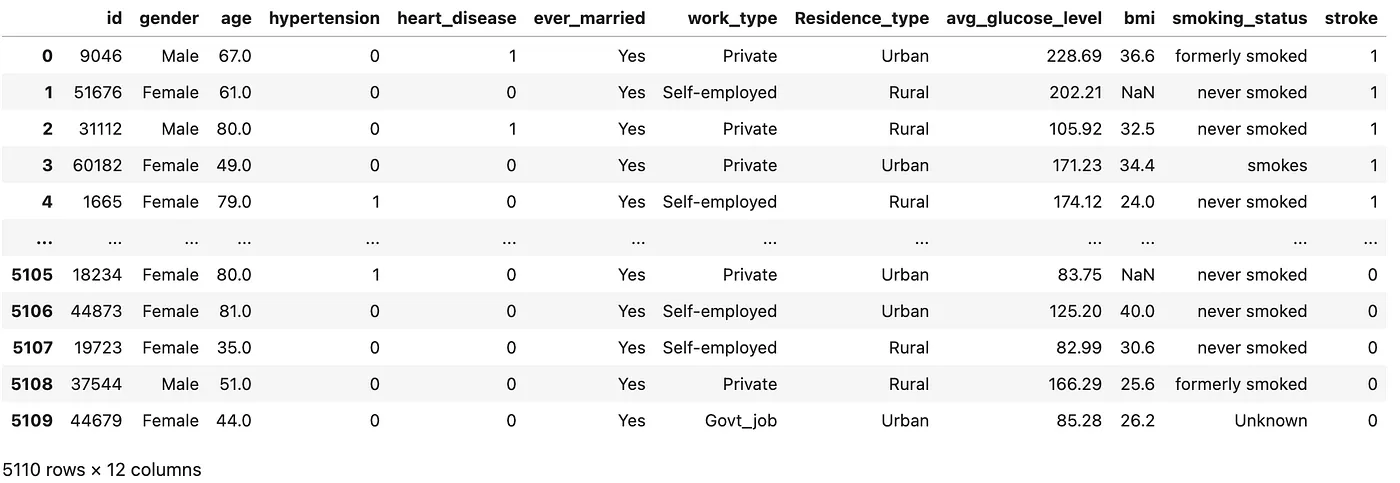
CSV files are great for storage — but analyzing them? SQL is built for slicing, dicing, and querying tabular data. So let’s dump the Pandas DataFrame into SQLite and turn this static file into something we can actually interrogate.
def pandas_to_sqlite(dataframe, db_fn):
    """convert a pandas dataframe to sqlite db"""

    with sqlite3.connect(db_fn) as conn:
        dataframe.to_sql(name = Path(csv_fn).stem, con = conn, if_exists = "replace")
How will the LLM access our SQL database? Tools.
LLM-human interactions are text-based. Dialogs like this, pairs of question+answer:
User: .. ?
Assistant: .. blabla maybe ..
User: .. ??
Assistant: .., better consult your doctor!
Enter tools.
User: What's the weather gonna be like tomorrow?

Assistant: Uhm no idea. I need the weather tool for this.

Weather tool: Tomorrow will be a bright and sunny day, with clear skies and
abundant sunshine throughout the region. Temperatures are expected to reach
a high of 26°C (79°F) and a low of 14°C (57°F). Light northeasterly
winds of 5–10 km/h (3–6 mph) will persist, with humidity ranging from
30% to 50%. The UV index will be high (6–7), so sun protection is advised.
There is no chance of rain, and visibility will remain excellent.
Ideal conditions for outdoor activities are expected, with good air
quality and no weather hazards. The warm and pleasant weather will
continue into the evening. The next forecast update will be issued at 10pm.

Assistant: It's gonna be a nice day, lots of sun.

User: NICE, i'll go cycling! Thank you
Tools
“Modern” LLMs know how to articulate when they need a tool. But they can’t execute the tool, they’re just text-producing things. We have to capture the tool calling intent, run the tool, and inject the tool output back into the dialog. The LLM will then go on and answer the initial question with that fresh data (or call another tool).
That’s what an agent is, an LLM with tools running in a for loop.
Setup LLM for Tool Calling
Tools are functions.
def run_sql(query, db_fn):
    """run given query against sqlite database; LLM tool"""
    print(f"Running SQL query:\n{query}")
    try:
        # Connect in read-only mode
        with sqlite3.connect(f"file:{db_fn}?mode=ro", uri=True) as conn:
            results = conn.execute(query).fetchall()
    except Exception as e:
        # Return error right back to LLM
        return str(e)

    return str(results)
That’s a very basic python function. It executes an SQL query on a read-only connected database, returning results or errors as strings.
How does the LLM know when and how to call this function? We pass it a tool definition.
run_sql_tooldef = {
    "type": "function",
    "function": {
        "name": "run_sql",
        "description": "Runs a SQL query on the stroke dataset",
        "parameters": {
            "type": "object",
            "properties": {
                "query": {
                    "type": "string",
                    "description": "The SQL query to execute"
                }
            },
            "required": ["query"]
        }
    }
}
This tells the LLM the name of the function (run_sql), a description of what it does (Runs a SQL query on the stroke dataset), and parameters required to run the function (query).
There’s also a neat function in the HF ecosystem to generate tool definitions dynamically from Python code. We are not gonna use that. As few blackboxes as possible.
Agent Mistral
For simplicity we use mistral-small via their official API. You will need an API key for this.
from mistralai import Mistral

client = Mistral(api_key="your api key")
The API is straightforward. To run a chat completion with tools:
chat_history = [
    dict(role="system", content = system_prompt), # We’ll define this next
    dict(role="user",   content = question),
]

inference = client.chat.complete(
    model = "mistral-small-latest",
    temperature = 0.3,
    messages = chat_history,
    tools = [ run_sql_tooldef ],   # Pass the SQL tool definition
    tool_choice = "auto"
)
Now we have:
- An SQLite database with our medical data.
- An LLM ready to chat.
- A tool that lets the LLM execute SQL queries on that database.
One more thing is missing. The LLM doesn’t know what to do with this setup. It needs instructions to define its role, constraints, and how to interact with the data.
System Prompt
Think of the system prompt as the LLM’s instruction manual. Just like humans, LLMs perform better when the task is crystal clear. If you notice the LLM making the same mistake repeatedly, you add a rule to the system prompt.
It’s a feedback loop: the more you work with the LLM, the better you get at anticipating its pitfalls and steering it toward accuracy. A good system prompt isn’t just instructions, it’s a guardrail against chaos.
system_prompt_template = """You are a helpful assistant that answers
questions about a stroke prediction dataset.

You have access to a SQLite database with a table
called [healthcare-dataset-stroke-data] (note the square
brackets due to hyphens in the name).

The table has the following columns:
{schema}

Only answer questions related to the data.
Your answers should be grounded in the data. No data, no answer.

Don't ever calculate anything yourself, use SQL instead.

Don't forget to wrap the table name in brackets. Example `SELECT * from [table]`.
"""
You might wonder about some of the statements in this prompt.
Your answers should be grounded in the data. No data, no answer.
The LLM does not know it’s in “CSV-RAG mode”. Without guardrails, it will happily speculate using its world knowledge, even if the answer is not in your dataset.
Don’t ever calculate anything yourself, use SQL instead.
LLMs are great at generating text but terrible at math.
Why the table schema matters
The LLM knows SQL and has a tool (run_sql) to execute queries, but it does not know your database’s structure. What columns exist? What data types are they?
Without schema, the SQL table is like a library without a catalog, just a room full of books. The LLM might eventually find what it’s looking for, but it will waste tokens sifting through irrelevant pages and probably invent a few “facts” along the way.
We solve this by extracting the schema from the Pandas DataFrame:
def pandas_to_schema(dataframe):
    """returns LLM/human readable schema of a pandas dataframe"""
    schema_info = []
    for col in dataframe.columns:
        unique_vals = dataframe[col].dropna().unique()
        dtype_str = 'text' if dataframe[col].dtype == 'object' else str(dataframe[col].dtype)
        if len(unique_vals) <= 5: schema_info.append(f"- {col}: {dtype_str} (values: {', '.join(map(str, unique_vals))})")
        else: schema_info.append(f"- {col}: {dtype_str}")

    return '\n'.join(schema_info)
This gives us a structured overview of the dataset:
- id: int64
- gender: text (values: Male, Female, Other)
- age: float64
- hypertension: int64 (values: 0, 1)
- heart_disease: int64 (values: 1, 0)
- ever_married: text (values: Yes, No)
- work_type: text (values: Private, Self-employed, Govt_job, children, Never_worked)
- Residence_type: text (values: Urban, Rural)
- avg_glucose_level: float64
- bmi: float64
- smoking_status: text (values: formerly smoked, never smoked, smokes, Unknown)
- stroke: int64 (values: 1, 0)
Everything’s set up.
First Tool Call
How many women are in the dataset?
question = "how many women are in the dataset?"

chat_history = [
    dict(role="system", content = system_prompt),
    dict(role="user",   content = question),
]

inference = client.chat.complete(
    model = "mistral-small-latest",
    temperature = 0.3,
    messages = chat_history,
    tools = [ run_sql_tooldef ],
    tool_choice = "auto"
)
assistantMsg = inference.choices[0].message
The LLM does not reply with text. Instead, it asks for the tool:
{
  "content": "",
  "tool_calls": [
    {
      "function": {
        "name": "run_sql",
        "arguments": "{\"query\": \"SELECT COUNT(*) FROM [healthcare-dataset-stroke-data] WHERE gender = 'Female';\"}"
      },
      "id": "FIrzsoMPL",
      "type": null,
      "index": 0
    }
  ],
  "prefix": false,
  "role": "assistant"
}Interpretation:
contentis empty, the LLM is not answering yet.- It’s delegating the work to the SQL tool, asking to run function
run_sqlwith parameterqueryasSELECT COUNT(*) FROM [healthcare-dataset-stroke-data] WHERE gender = ‘Female’.
Executing the Tool
We run the SQL query, capture the result, and feed it back to the LLM:
for tool_call in assistantMsg.tool_calls:
    # we only have one tool
    assert tool_call.function.name ==  "run_sql"

    # run the tool, save response
    tool_response = run_sql(db_fn=db_fn, **json.loads(tool_call.function.arguments))

    # for debug
    print (f"LLM used tool {tool_call.function.name}")
    print (f"Tool output: {tool_response}")

    # update chat history with tool response
    chat_history.append(
      dict(
        role="tool",
        name=tool_call.function.name,
        tool_call_id=tool_call.id,
        content=tool_response
       )
    )
Debug output:
Running SQL query:
SELECT COUNT(*) FROM [healthcare-dataset-stroke-data] WHERE gender = 'Female';
LLM used tool run_sql
Tool output: [(2994,)]
Agent Mistral: Tool Calls in a Loop
An agent is just this simple cycle in a for loop:
- LLM receives a question.
- If it needs data, it calls the SQL tool.
- We run the query and return the results.
- The LLM uses the data to answer the question.
Repeat until the LLM responds with an answer (not a tool call).
What’s the average BMI of the patients with and without hypertension ?
* Iteration 0
Running SQL query:
SELECT hypertension, AVG(bmi) as avg_bmi FROM [healthcare-dataset-stroke-data] GROUP BY hypertension
LLM used tool run_sql
Tool output: [(0, 28.4740690892777), (1, 33.03658536585366)]

* Iteration 1

Agent says: The average BMI of patients without hypertension (hypertension = 0)
is approximately 28.47, and for patients with hypertension (hypertension = 1),
 the average BMI is approximately 33.04.
Is hypertension a risk factor for stroke?
* Iteration 0
Running SQL query:
SELECT
    hypertension,
    AVG(stroke) as avg_stroke
FROM
    [healthcare-dataset-stroke-data]
GROUP BY
    hypertension;
LLM used tool run_sql
Tool output: [(0, 0.03967909800520382), (1, 0.13253012048192772)]

* Iteration 1

Agent says: The average stroke rate for people with hypertension is 13.25%
and for people without hypertension it is 3.97%.

This indicates that hypertension is a risk factor for stroke.
Is drinking red wine a risk factor for diabetes?
(negative control)
* Iteration 0
Running SQL query:
SELECT smoking_status, COUNT(*) as count, SUM(stroke) as total_strokes FROM [healthcare-dataset-stroke-data] GROUP BY smoking_status;
LLM used tool run_sql
Tool output: [('Unknown', 1544, 47), ('formerly smoked', 885, 70), ('never smoked', 1892, 90), ('smokes', 789, 42)]

* Iteration 1

Agent says: The stroke dataset does not contain any information about
drinking red wine or diabetes. Therefore, I cannot provide an answer to
your question based on this dataset.
And that’s it!
Find the complete script csv-rag.py on GitHub. Want to stay local? The script also contains an implementation using a local Qwen3 4B model as LLM.
Ideas for improvements:
- Use multiple CSV files
- Add evaluations
- Speedup with VLLM
- Prevent SQL Injections
And probably a ton more I can’t think of right now.